
How to Customize Your Acuity Scheduling Booking Page (3 Levels)
TL;DR
- Level 1 — built-in options. Acuity lets you adjust things like your logo, colors, and scheduling page text. Quick and free, but the page still looks and behaves like Acuity.
- Level 2 — custom CSS and embed choices. Depending on your Acuity plan, you may be able to restyle the page with CSS and choose how it embeds. The ceiling: you can restyle Acuity's flow, but you can't restructure it — and analytics tools still can't see inside the iframe.
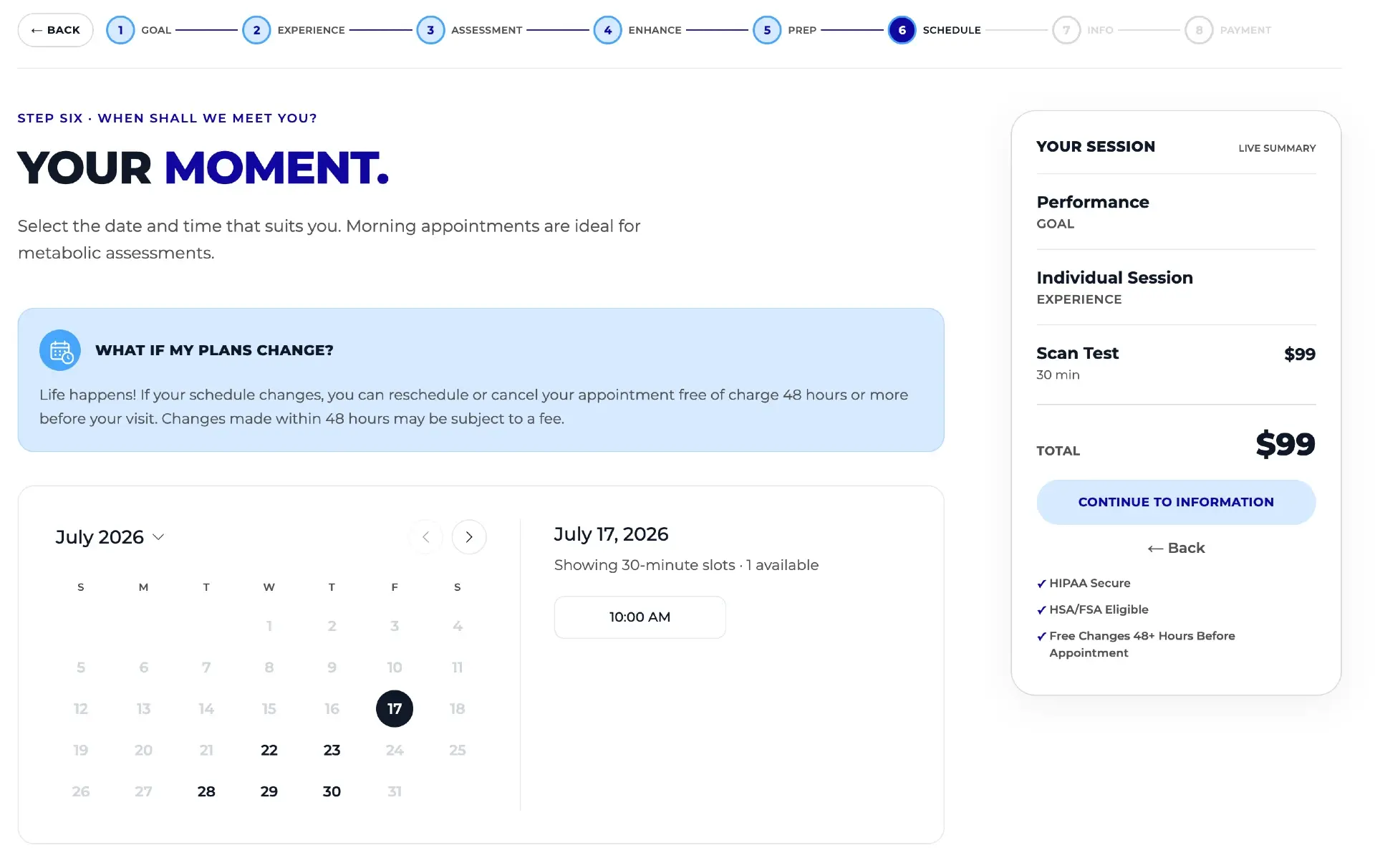
- Level 3 — a fully custom, white-labeled booking flow built on top of Acuity. Total control of brand, flow, and content, while Acuity remains the source of truth. See what that looks like on the custom scheduler page.
- Live example of Level 3: the custom booking flow at DexaFit Denver.
You can customize your Acuity Scheduling booking page at three levels: built-in appearance options (logo, colors, page text), custom CSS and embed choices (restyle the page within Acuity's structure), or a fully custom, white-labeled booking flow that uses Acuity behind the scenes. Each level buys more control over branding, flow, and conversion — this guide walks through all three.
The right level depends on what's actually bothering you. If the page just looks a bit generic, Level 1 may be enough. If the fonts and colors clash with your site, Level 2 helps. If the problem is the flow itself — no upsells, no education, no analytics visibility, a generic experience that doesn't match a premium brand — only Level 3 fixes that.
Level 1: What can you customize with Acuity's built-in options?
Acuity ships with a set of appearance options for your scheduling page. Exactly what's available depends on your Acuity plan and current settings, but the built-in customization generally covers the basics of making the page recognizably yours:
- Your logo on the scheduling page, so clients see your brand at the top.
- Colors for the page and buttons, so the palette roughly matches your site.
- Scheduling page text — instructions, descriptions, and messaging that appear around the booking form.
- Service names, descriptions, and images for each appointment type, which double as your merchandising.
This level is quick and costs nothing beyond your existing subscription, so it's worth doing regardless of whether you go further. Check your Acuity plan and settings for what's included — options vary, and Acuity updates its interface over time, so don't rely on screenshots from old blog posts.
The Level 1 ceiling
Even with the logo and colors dialed in, the page is still unmistakably an Acuity page: Acuity's layout, Acuity's steps, Acuity's form structure. You're decorating a template, not designing an experience. For many businesses that's fine — for a premium brand, it often isn't.
Level 2: Custom CSS and embed choices — how far can they go?
The next step up is controlling where the booking page lives and how it's styled. Acuity offers embed options for placing the scheduler on your own website, and — depending on your plan — some ability to apply custom styling or CSS to the scheduling page. Again, check your Acuity plan and settings for what's available to you; the specifics are plan-dependent and change over time.
Done well, Level 2 gets you a booking page that sits on your domain, inside your site's header and footer, with fonts and colors that no longer fight your design. If a developer writes the CSS, the result can look surprisingly polished.
The hard ceiling: restyle, not restructure
Here's what CSS cannot change, no matter how skilled the developer: it's still Acuity's flow, in Acuity's iframe. The steps, the order of the steps, what appears on each screen, how services are presented, where add-ons show up — all of that is Acuity's structure. You can repaint the walls; you can't move them. There's no way to add an intent-based question, insert an educational video, surface a bundle at the right moment, or show prep instructions before checkout.
The iframe also blinds your analytics
Because the embedded scheduler runs inside an iframe served from Acuity's domain, tools like Hotjar and Microsoft Clarity can't record what happens inside it — your session recordings and heatmaps go dark at the exact moment a visitor starts booking. Full explanation: why the Acuity iframe blocks analytics tracking.
So Level 2 is the right stopping point if your goal is purely cosmetic. If your goal is a booking experience that converts better — more add-ons, clearer decisions, measurable drop-off — you've hit the wall.
Level 3: A fully custom, white-labeled booking flow on top of Acuity
The third level stops trying to customize Acuity's page and replaces the customer-facing layer entirely: a custom-built booking flow that lives on your site, carries only your brand, and talks to Acuity behind the scenes. It's a done-for-you custom build, not a SaaS template — designed around your services, your customers, and your upsell strategy.
Critically, Acuity remains the source of truth. Pricing, availability, and services sync automatically from your Acuity account, so there's no second system to manage and your staff's workflow doesn't change. Your team keeps working in Acuity exactly as before; only your customers see the difference.
What total control of the flow unlocks
- Intent-based recommendations. Instead of expecting visitors to know exactly which service they need, the flow starts with their goals and recommends the most relevant services.
- Education inside the flow. Videos, sample reports, and supporting content sit at the decision point, so customers make informed choices without leaving the page.
- Personalized prep instructions. Customers see the preparation guidelines for the exact services they selected — before checkout, not buried in an email.
- Upsells and bundles that get seen. Add-ons are prominent and complementary services are recommended naturally through the flow — the biggest lever for increasing average ticket in the booking flow.
- A persistent summary sidebar. Selections, pricing, and bundle savings stay visible the whole time, and customers can browse the full catalog without losing their progress.
- A site-wide recommendation engine. The same intent-based recommendations can run across your whole website, not just the booking page.
What it unlocks beyond the flow
- Analytics that actually work. The flow is native page code, not an iframe — Hotjar and Microsoft Clarity recordings and heatmaps cover the entire booking journey.
- Better ad attribution. A custom thank-you page enables Enhanced Conversions for Google and Meta, feeding richer conversion data back to your campaigns.
- Card-fee recovery. The flow can add the roughly 3% card processing cost as a fee for customers who choose to pay by card, where local rules permit it.
- Physical gift cards. A full workflow — card designs, recipient shipping details, code generation, and handoff to a printing and fulfillment provider.
See a live build
The first custom scheduler build is live at DexaFit Denver — click through it as if you were a customer. Early data from the first weeks showed roughly a 30% lift in average ticket value, mostly from more customers choosing bundles and add-ons. Early numbers, but a useful signal of what flow control is worth.
Comparing the 3 levels of Acuity customization
| Level 1: Built-in | Level 2: CSS & embed | Level 3: Custom flow | |
|---|---|---|---|
| Branding control | Logo, colors, page text | Fonts and styling on your domain | Total — every screen, word, and pixel |
| Flow control | None — Acuity's steps | None — restyled, not restructured | Total — intent-based, education, prep, your order of steps |
| Upsells & bundles | Whatever Acuity shows | Same as Level 1 | Prominent add-ons, recommended bundles, savings shown live |
| Analytics visibility | Blocked by the iframe | Still blocked by the iframe | Full — recordings, heatmaps, Enhanced Conversions |
| Effort / cost | Minutes, included in Acuity | Developer time for CSS; plan-dependent | A scoped custom build (done for you) |
| Who it's for | Everyone — do this first | Brands that want cosmetic polish only | Businesses where booking is the revenue engine |
A simple way to decide: if your booking page is a utility, Levels 1–2 are enough. If your booking page is your storefront — the place where average ticket, conversion rate, and first impressions are decided — Level 3 is where the return lives.
Which level should you choose?
- Start with Level 1 today. Add your logo, match your colors, and tighten your scheduling page text — it's free and takes minutes. Check your Acuity plan and settings for the exact options available.
- Add Level 2 if the look still bothers you. Embed the scheduler on your own site and, if your plan allows custom styling, have a developer align fonts and colors with your brand.
- Go to Level 3 when the flow is the problem. Generic experience, invisible analytics, buried add-ons, customers arriving unprepared — those are structural issues CSS can't touch. A white-labeled custom booking flow fixes the structure while Acuity keeps running everything behind the scenes.
Customization after the booking, too
The booking page is only half the client experience. If clients still have to call you to change an appointment, the polish ends at checkout — see how to let clients reschedule their own Acuity appointments for the other half.
Put this on autopilot
Tecton Scheduler does this for your Acuity account
Self-serve reschedule links with automatic fees via Square or Stripe, plus revenue, no-show, and demand analytics — synced straight from Acuity Scheduling. Live in about 15 minutes.
Frequently asked questions
Can you fully white-label Acuity Scheduling?
Not with built-in settings alone — Acuity's appearance options and CSS styling still leave you inside Acuity's flow and iframe. Full white-labeling means building a custom booking flow on top of Acuity: your brand and flow on the surface, with Acuity still managing pricing, availability, and services as the source of truth.
Does Acuity Scheduling support custom CSS?
Acuity offers some custom-styling ability, but what's available depends on your plan — check your Acuity plan and settings. Even where CSS is supported, it can only restyle the page: the steps, structure, and iframe remain Acuity's, so you can change how it looks but not how it works.
Why can't I track my Acuity booking page in Hotjar or Clarity?
The embedded Acuity scheduler runs inside an iframe served from Acuity's domain, and analytics tools can't record activity inside a cross-domain iframe. Recordings and heatmaps stop at the moment booking starts. A custom booking flow is native page code, so the entire journey becomes visible and measurable.
Does a custom booking flow replace Acuity Scheduling?
No. Acuity stays the source of truth — pricing, availability, and services sync to the custom flow automatically, so there's no second system to manage and staff keep working in Acuity as before. Only the customer-facing experience changes; everything behind it stays exactly where it is.
Is a custom Acuity booking flow a SaaS product?
No — it's a done-for-you custom build designed around your specific business: your services, your brand, your upsell strategy. That's what makes total control of the flow possible; a subscription template would put you back inside someone else's structure, just a different one than Acuity's.
Is there a live example of a custom booking flow built on Acuity?
Yes — the custom scheduler at DexaFit Denver (denver.dexafit.com/appointments) is live in production. You can click through it like a customer: intent-based recommendations, education content, prep instructions, bundles, and a persistent summary sidebar, all synced with Acuity behind the scenes.
Keep reading
Why You Can't See What Happens Inside the Acuity Iframe
The standard Acuity embed is an iframe from another domain, so Hotjar, Microsoft Clarity, and your ad pixels go blind at the exact moment a visitor starts booking. This guide explains the browser security behind it, what the blind spot costs, the partial workarounds, and the full fix.
Read guideHow to Increase Average Ticket Value in Your Booking Flow
The booking flow is the best place to raise average ticket value — the customer is already committed, card in hand. Seven ranked tactics, and where the standard Acuity embed limits each one.
Read guideHow to Let Clients Reschedule Their Own Appointments in Acuity
Acuity lets clients reschedule through the link in their confirmation email — but only date and time, only one appointment at a time, and only if they still have the email. This guide covers the settings that control it, why clients get stuck, and how to give them a standalone branded reschedule link.
Read guide