
Why You Can't See What Happens Inside the Acuity Iframe
TL;DR
- The standard Acuity embed is an iframe served from Acuity's domain. Browsers isolate cross-origin iframes, so scripts on your page — Hotjar, Microsoft Clarity, Google Analytics, ad pixels — cannot see anything inside it.
- You keep the browsing journey and lose the buying journey: no session recordings, no heatmaps, no field-level drop-off data for the booking flow itself.
- A redirect or thank-you page after booking restores basic conversion counting for Google Ads and Meta, but it can't tell you *why* people abandon mid-flow.
- The full fix is a native booking flow on your own domain that stays synced with Acuity — recordings, heatmaps, funnel analytics, and Enhanced Conversions all work end to end. That's what a custom scheduler is.
Hotjar, Microsoft Clarity, and other analytics tools can't record inside the Acuity Scheduling embed because it's an iframe served from Acuity's domain, and browsers deliberately isolate cross-origin iframes: scripts on your page cannot read anything inside a frame from another site. Your tracking works perfectly right up to the booking box — then goes blank.
This isn't a bug in Hotjar or a Clarity misconfiguration — it's standard browser security, and it applies to every session-recording and heatmap tool on the market. This guide explains what's happening, what the blind spot costs you, which workarounds recover part of the picture, and what it takes to see the whole booking journey.
How does the standard Acuity embed actually work?
When you embed Acuity Scheduling on your website, you paste a snippet that inserts an <iframe> into your page. An iframe is a browser window inside a browser window: the frame's content — the service list, the calendar, the checkout form — is a separate web page loaded from Acuity's servers, on Acuity's domain, not yours. Your page is just the picture frame around it.
Visually, it looks like one page. Technically, it's two: your site and Acuity's site, sharing a screen. Everything a visitor does inside that box happens in Acuity's document, not yours — a distinction invisible to customers and decisive for your analytics.
The same boundary is why the embed always looks like Acuity rather than like your brand — a related problem we cover in how to customize your Acuity scheduling page. Here we're focused on the measurement side: what your tools can and cannot see across that boundary.
Why can't Hotjar or Microsoft Clarity record inside the Acuity iframe?
Hotjar, Microsoft Clarity, and every similar tool work the same way: a JavaScript snippet on your page watches the document it's installed on — mouse movement, scrolling, clicks, form interactions — and reconstructs sessions and heatmaps from what it observes. The catch: a script can only observe its own document.
Browsers enforce a security rule called the same-origin policy: a page from one origin (domain) cannot read the contents of an iframe from a different origin. This is foundational web platform behavior — it's what stops a random website from embedding your bank in a hidden frame and reading your account. Since your domain and Acuity's are different origins, your Hotjar or Clarity script can see that an iframe exists and where it sits — and not a single pixel, click, or keystroke inside it.
No tag, setting, or plugin can lift this
The same-origin policy is enforced by the browser itself, on every visitor's machine. No Hotjar configuration, Clarity flag, Google Tag Manager trigger, or WordPress plugin can read across a cross-origin iframe boundary. Recording inside the frame would require the tracking script to run on Acuity's own pages — and session-recording tools aren't an option Acuity's integrations currently advertise (check current settings).
That's why the symptom is so consistent: recordings look flawless across your site, then show a visitor sitting motionless on the booking page. They weren't idle — they were booking, inside a box your tools are forbidden to watch.
What does the Acuity iframe blind spot cost you?
The blind spot starts at the worst possible moment. You get full visibility into the browsing journey — how people arrive, what they read, which pages convince them to book. You lose the buying journey — everything between “clicked book” and “paid.” Concretely:
- No session recordings of the booking flow. You can't watch a single real customer move through service selection, scheduling, and checkout — the steps where revenue is actually won or lost.
- No heatmaps on booking steps. Which services get hovered and skipped, whether anyone scrolls to the add-ons, where taps rage-cluster on mobile: all invisible.
- No field-level drop-off data. If one confusing intake question or the card form is killing 30 seconds of momentum, nothing in your stack will ever point at it.
- No funnel steps in your analytics. Google Analytics sees a visit to the page hosting the iframe, then silence. You can't build a step-by-step booking funnel from your own site's data.
- Weak ad attribution by default. Without a conversion event your pixels can observe, Google Ads and Meta can't reliably learn which clicks became bookings — so their optimization runs on thin data.
The compounding cost: you can't run the optimization loop — observe, hypothesize, change, measure — on your highest-intent traffic. Businesses A/B test their homepages obsessively while their checkout sits in a box no one can see into. The levers that matter most live inside the flow, as we show in how to increase average ticket in your booking flow.
Can you track Acuity bookings with a redirect or thank-you page?
Partially, yes — and if you're running paid traffic to an Acuity embed, you should. The idea: after a completed booking, send the client to a confirmation page on your own domain. Your pixels can see that page, so landing on it becomes a countable conversion. The typical setup:
- Create a thank-you page on your website (e.g.
/booking-confirmed) that clients only reach after booking. - Configure Acuity to send clients to that URL after a completed booking — Acuity has supported post-booking redirect and tracking options, but the exact settings and what they allow have changed over time, so check your Acuity settings for what's available on your plan.
- Fire your Google Ads and Meta conversion events on that page, via your tag manager or hard-coded tags.
- Exclude the page from search indexing and direct navigation where possible, so stray visits don't inflate conversion counts.
This restores basic conversion counting: campaigns and keywords can now be judged on bookings, not clicks. What it doesn't restore is everything in between. The redirect fires only for people who finish; anyone who abandoned at step two never reaches your page, and you learn nothing about where or why they left.
A thank-you page is a tripwire, not a camera
Redirect-based tracking tells you *that* someone booked, not *what happened* on the way. Recordings, heatmaps, and drop-off analysis still end at the iframe. And the conversion data itself is thin — often just a page view, without the order details or customer data that Enhanced Conversions need to work well.
Do Acuity conversion-tracking plugins fix the iframe problem?
There's a whole category of conversion-tracking plugins, scripts, and integrations for Acuity — tools that catch booking completions and forward them to Google Analytics, Google Ads, or Meta. Within their lane, they're useful: they can make conversion counting more reliable and richer than a bare page-view tripwire, and some can attach booking details to the event.
But read what they do carefully: they report the outcome of a booking. None of them can put Hotjar or Microsoft Clarity inside the frame, because the limit isn't tooling — it's the browser's same-origin policy. For behavior analytics, tracking still ends at the iframe boundary no matter which plugin you add.
So the honest ceiling of the workaround stack is conversion counts, mostly for completed bookings, with limited context. Worth setting up — but it measures the funnel's exit, not the funnel.
Which Acuity tracking approach shows you the most?
| What you can see | Standard Acuity embed | Embed + redirect-page tracking | Native custom flow on your domain |
|---|---|---|---|
| Session recordings of the booking flow | No — blank inside the iframe | No — still blank inside the iframe | Yes — end to end, in Hotjar or Clarity |
| Heatmaps on booking steps | No | No | Yes — every step, every device |
| Funnel steps & drop-off points | No | Only the final “booked” event | Yes — step-by-step, including abandonment |
| Enhanced Conversions (Google/Meta) | No | Limited — thin page-view-level data | Yes — custom thank-you page passes richer conversion data |
| Effort to set up | None — paste the embed | Low — a page, a redirect, some tags | Highest — a custom build, done for you |
The pattern: each column to the right trades effort for visibility. The embed is free and blind; the redirect page is cheap and one-eyed; only a flow that's native page code on your own domain gives your analytics stack the same view of booking that it already has of browsing.
How do you get full visibility into your Acuity booking funnel?
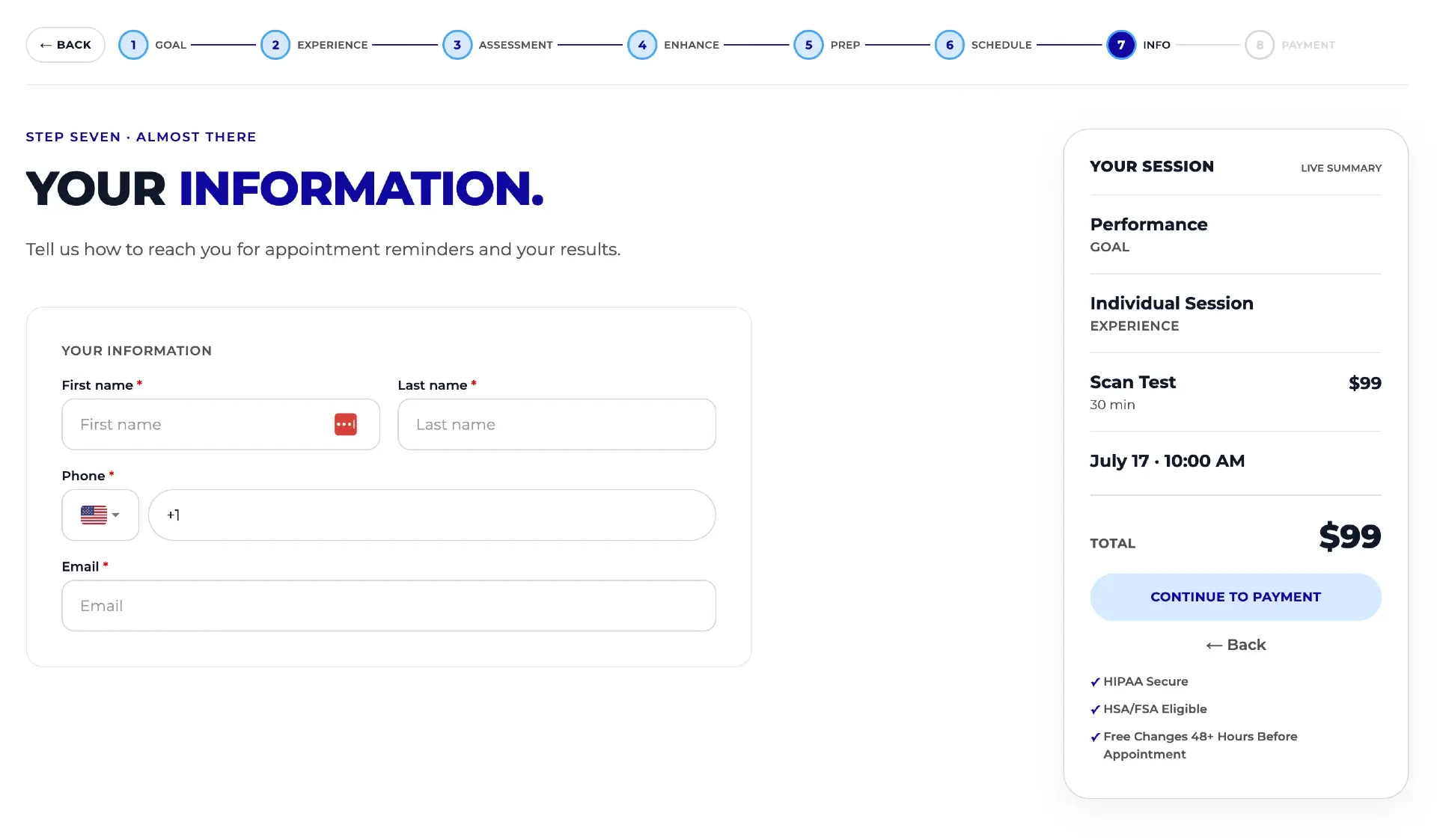
By removing the iframe, not fighting it: replace the embed with a booking flow built natively into your own website that stays synced with Acuity. That's what our custom scheduler is — a fully white-labeled, done-for-you custom build (not a SaaS template) where Acuity remains the source of truth. Pricing, availability, and services sync automatically; your staff keeps working in Acuity exactly as before.
Because the flow is regular page code on your domain, there is no cross-origin boundary left to hit. The measurement problems in this guide simply stop existing:
- Session recordings and heatmaps work end to end. Hotjar and Microsoft Clarity record the entire buying journey — service selection, add-ons, checkout — because there's no iframe to go blind in.
- Every funnel step is observable. You can see exactly where customers hesitate or abandon, then fix that step and measure the result.
- A custom thank-you page passes richer conversion data to Google Ads and Meta, enabling Enhanced Conversions, better attribution, and better ROAS optimization over time — instead of a bare page-view ping.
Visibility is half the value; the other half is that a flow you control can be designed to convert. The custom scheduler opens with intent-based questions and recommends services, puts education — videos, sample reports — inside the flow, shows prep guidelines personalized to the selected services, makes add-ons and bundles prominent, and keeps a floating summary with bundle savings on screen. Customers can browse the catalog without losing progress, the recommendation engine can run site-wide, and the flow can recover the roughly 3% card processing cost as a card fee where permitted. It even handles physical gift cards, from design selection to fulfillment handoff.
The first build is live in production at DexaFit Denver. It's early — live for a matter of weeks — but initial numbers show roughly a 30% higher average ticket value, driven primarily by more customers choosing bundles and add-ons. Treat that as an encouraging early signal, not a guarantee; the durable gain is that with recordings, heatmaps, and funnel data flowing, you can keep improving the flow instead of guessing.
Close the loop with owner analytics
Behavior data tells you what happens before the booking; the Tecton analytics dashboard tells you what happens after — revenue trends, demand forecasts, and staff utilization from your Acuity data. For what Acuity reports alone can and can't show, see our Acuity Scheduling analytics dashboard guide.
Put this on autopilot
Tecton Scheduler does this for your Acuity account
Self-serve reschedule links with automatic fees via Square or Stripe, plus revenue, no-show, and demand analytics — synced straight from Acuity Scheduling. Live in about 15 minutes.
Frequently asked questions
Why is Hotjar not recording my Acuity Scheduling booking page?
Hotjar is recording your page — but the Acuity embed is an iframe served from Acuity's domain, and browsers block scripts on your site from seeing inside cross-origin iframes. Recordings show visitors reaching the booking page and then apparently going idle. Nothing is broken in your Hotjar setup; no setting on either side can lift the restriction.
Does Microsoft Clarity work inside the Acuity iframe?
No. Microsoft Clarity has the same limitation as Hotjar and every other session-recording tool: the browser's same-origin policy prevents a script on your domain from reading content inside an iframe from another domain. Clarity records everything on your site up to the iframe boundary, and nothing inside the Acuity booking flow itself.
Can Google Analytics track what happens inside the Acuity embed?
Not from your site's tag. Your Google Analytics sees a visit to the page hosting the iframe, but the steps inside the booking flow happen in Acuity's document. Acuity offers its own tracking-related settings and there are conversion plugins that report completed bookings, but a step-by-step funnel of the flow isn't available from your own page's analytics.
How do I track Acuity bookings as conversions in Google Ads?
The common approach is a thank-you page on your own domain that clients reach after booking, with your Google Ads conversion tag firing there — check your Acuity settings for the redirect options available on your plan. This counts completed bookings but passes thin data. A native booking flow with a custom thank-you page can pass richer data and enable Enhanced Conversions.
Do I have to leave Acuity Scheduling to fix the iframe tracking problem?
No. A custom booking flow can run natively on your website while Acuity remains the source of truth behind it — pricing, availability, and services sync automatically, and your staff keeps managing everything in Acuity. Customers book through your branded flow, where recordings, heatmaps, and conversion tracking all work, and appointments land in Acuity as usual.
Is the 30% higher average ticket from a custom booking flow typical?
It's one early data point, not a benchmark. The first custom scheduler build, live at DexaFit Denver, saw roughly 30% higher average ticket value in its first weeks, driven mainly by customers choosing bundles and add-ons. Results depend on your services, pricing, and traffic — the reliable gain is visibility: you can finally see and optimize the booking flow itself.
Keep reading
How to Customize Your Acuity Scheduling Booking Page (3 Levels)
You can customize an Acuity booking page at three levels: built-in appearance settings, custom CSS and embed tweaks, or a fully white-labeled custom flow that keeps Acuity as the source of truth. This guide covers what each level can and can't change.
Read guideHow to Increase Average Ticket Value in Your Booking Flow
The booking flow is the best place to raise average ticket value — the customer is already committed, card in hand. Seven ranked tactics, and where the standard Acuity embed limits each one.
Read guideAcuity Scheduling Analytics: 4 Ways to Build a Dashboard
Acuity's built-in reports stop at booked revenue and appointment counts. This guide compares the four real ways to get an analytics dashboard — built-in reports, CSV exports, Looker Studio connectors, and a purpose-built tool — by cost, effort, and the KPIs you actually get.
Read guide