
How to Let Clients Reschedule Their Own Appointments in Acuity
TL;DR
- Clients reschedule Acuity appointments through the link in their confirmation email. They can change the date and time only, one appointment at a time.
- Your scheduling limits control whether self-rescheduling is allowed and how close to the appointment it cuts off — but blocking is the only lever. Acuity can't attach a fee or any condition to a reschedule.
- There is no standalone reschedule portal in Acuity. If the client loses the confirmation email, their only option is contacting you.
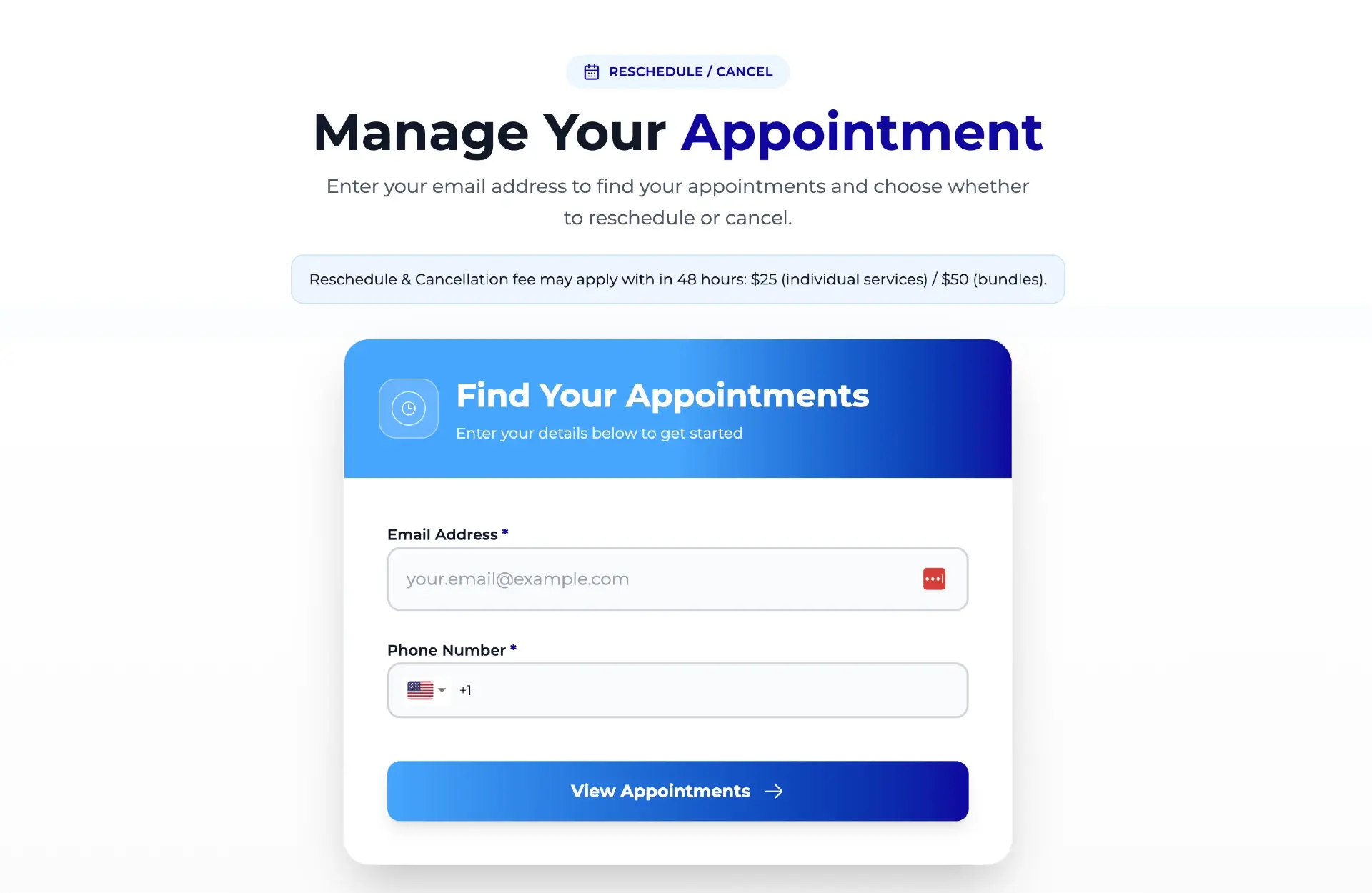
- Tecton Scheduler adds a branded public reschedule link on top of your existing Acuity account: clients verify their email and phone, pick a new slot from live availability, and pay an optional late-reschedule fee via Square or Stripe — no account, no phone call.
Acuity Scheduling lets clients reschedule their own appointments through the link in their confirmation email: allow client changes in your scheduling limits, set a cutoff window, and clients can pick a new date and time themselves. There is no standalone reschedule portal — if the email is gone, the client has to contact you. This guide covers the settings, the limits, and the fixes.
Below: how the built-in flow works, how to configure it, the gaps that generate phone calls, a troubleshooting checklist for when a client can't reschedule, and how to give clients a reschedule link that works without the original email.
Can clients reschedule their own appointments in Acuity Scheduling?
Yes — with conditions. When a client books through Acuity Scheduling (formerly Squarespace Scheduling), their confirmation email includes a link to change the appointment. Through that link they can move the appointment to a new date and time, pulled from your real availability. That's the entire self-service surface.
What the link does not do matters just as much. Clients can't change the service or add conditions to the change — the link is strictly a date/time swap. It handles one appointment at a time, so a client with a series of bookings works through them individually. And the link lives only in the emails Acuity sent for that specific appointment: there is no general "manage my appointments" page a client can visit, and no way for them to look an appointment up by name or email.
The lost-email dead end
Because the reschedule link exists only inside the confirmation and reminder emails, a deleted email or a typo'd address means the client physically cannot self-reschedule. Every one of those becomes a call, text, or no-show. The fix is a standalone link — covered below.
How to enable (or restrict) client rescheduling in Acuity
Client self-rescheduling is governed by your scheduling limits and policy settings. The two decisions that matter:
- Decide whether clients can change appointments at all. Acuity's scheduling limits let you allow client rescheduling and cancellation, or block them so all changes go through you. For most businesses, allowing self-reschedules is the right default — a moved appointment keeps revenue on the calendar, and every self-serve change is a phone call you don't take.
- Set the cutoff window. You can block client changes inside a window before the appointment — for example, no self-reschedules within 24 hours. Inside the window, the link stops offering changes and the client must contact you. 24 hours is the common default; 48 hours fits high-prep services.
- Point clients at the link before they need it. Add a line to your confirmation and reminder emails: "Need to change your appointment? Use the reschedule link in this email." Copy-paste wording is in our reschedule email templates.
- Test it. Book a dummy appointment as a client, open the confirmation email, and walk through the reschedule flow yourself. You'll see exactly what your clients see — including where it stops working.
A cutoff window is not a policy
Blocking self-reschedules inside 24 hours doesn't enforce anything — it just reroutes the late change to your phone, where you either absorb it or have an awkward conversation. Acuity has no reschedule-fee concept at all, so there's no way to say "you can move it, but late moves cost $15." If you want that, see how to charge a reschedule fee in Acuity.
What your rescheduling settings can and can't control
The built-in flow is genuinely useful when the stars align: client has the email, wants a simple date change, and is outside your cutoff. Here's how it compares to a standalone branded reschedule link running on top of the same Acuity account:
| Acuity built-in link | Tecton Scheduler link | |
|---|---|---|
| Where clients find it | Confirmation email only | One public link per business — website, SMS, email signature, anywhere |
| Works when the email is lost | No — dead end, client must contact you | Yes — client verifies email + phone on the page itself |
| What clients can change | Date and time only | Date and time, picked from live Acuity availability |
| Account or login required | No | No — email and phone verification only |
| Late-reschedule fee | Not possible — no fee concept exists | Optional, collected automatically via Square or Stripe at confirmation |
| Page branding | Acuity's reschedule page | Your branded reschedule page |
| You're notified | Standard Acuity notifications | Read-tracked notifications feed of every reschedule and fee |
The structural limitation is the delivery mechanism: a link buried in one email, for one appointment, with no fallback. Everything else — no fees, no conditions, no portal — follows from Acuity treating rescheduling as a courtesy feature rather than a policy surface.
Why can't my client reschedule their Acuity appointment? Troubleshooting
When a client says "the link isn't working" or "it won't let me change it," it's almost always one of these:
- They're inside your cutoff window. If your scheduling limits block changes within, say, 24 hours, the link stops offering a reschedule inside that window. This is the single most common cause. Check what your window is set to and whether the appointment falls inside it.
- Self-rescheduling is disabled. If your settings don't allow client changes at all, the link won't offer them. Review your Acuity scheduling limits and policy settings.
- They lost the email. No confirmation email means no link — there's nothing to troubleshoot. You (or a standalone reschedule link) are the only path forward.
- No slots are showing. The link only offers times from your live availability. A fully booked calendar, reduced hours, or changed availability for that appointment type looks to the client like a broken link.
- The appointment is already past or cancelled. A link tied to an appointment that no longer exists in an active state typically won't offer changes — the client needs to book fresh.
- They're changing the wrong thing. The link changes date and time only. A client trying to switch services or make any other change will feel stuck — that change goes through you.
Log the failures for a month
Every "can you move my appointment?" call or text is a self-service failure with a cause from the list above. A month of tallies tells you whether your problem is the cutoff window, the lost emails, or availability — and whether it's worth fixing with settings or with a better link.
How to set up self-serve rescheduling rules that protect revenue
Tecton Scheduler layers on top of your existing Acuity account — it doesn't replace it. It syncs your appointments and services from Acuity, then gives your business one public branded reschedule link you can put anywhere: your website, reminder texts, voicemail greeting, email signature. Here's the flow:
- Connect your Acuity account. Appointments and services sync on demand or on a schedule, and credentials are encrypted at rest.
- Set your reschedule window and optional late-reschedule fee once in Settings. Your public link is generated per business.
- A client opens the link and verifies their email and phone number — no account, no password, no original email required.
- They pick a new slot from live Acuity availability, so double-booking isn't possible.
- If the change falls inside your fee window, the fee is collected automatically via Square or Stripe before the new time is confirmed. The client gets an instant email confirmation.
- You see every reschedule — and every fee charged or declined card — in one filterable notifications feed.
The lost-email dead end disappears, the 11pm "can I move Thursday?" text answers itself, and your late-change policy becomes a rule the system enforces instead of a conversation you have. Setup takes about 15 minutes, every plan starts with a free trial, and billing is month-to-month — see pricing.
Should you charge clients a fee to reschedule?
Usually not for early changes — a reschedule is the good outcome, and you want zero friction on it. The question is late reschedules, where the moved slot is hard to refill. The common pattern: free changes outside your window, and a modest fee inside it — smaller than your cancellation fee, so clients always prefer moving the appointment to dropping it.
Acuity can't do any version of this: its policies address cancellations and no-shows only, and even those fees are charged manually. A fee-gated reschedule link is the piece you add on top. For fee amounts, windows, and the setup walkthrough, see charging a reschedule fee in Acuity; for the mechanics of shareable links, see how Acuity reschedule links work.
Put this on autopilot
Tecton Scheduler does this for your Acuity account
Self-serve reschedule links with automatic fees via Square or Stripe, plus revenue, no-show, and demand analytics — synced straight from Acuity Scheduling. Live in about 15 minutes.
Frequently asked questions
Can clients reschedule their own appointments in Acuity Scheduling?
Yes. Every Acuity confirmation email includes a link the client can use to move their appointment to a new date and time, provided your scheduling limits allow client changes and the appointment is outside your cutoff window. They can change date and time only, one appointment at a time — there is no standalone portal.
Why can't my client reschedule their Acuity appointment?
The most common causes: the appointment is inside your cutoff window, self-rescheduling is disabled in your scheduling limits, the client lost the confirmation email that contains the link, no open slots are showing in your availability, or the appointment was already cancelled. Check the cutoff window first — it's the usual culprit.
Can a client reschedule in Acuity without the confirmation email?
No. The reschedule link exists only in the confirmation and reminder emails for that specific appointment. Acuity has no page where a client can look up their booking by name or email. If the email is gone, the client must contact you — or use a standalone reschedule link tool like Tecton Scheduler, which verifies identity by email and phone instead.
Can clients change the service or provider when rescheduling in Acuity?
No. The built-in reschedule link changes the date and time only — the service, provider, and every other detail stay fixed. A client who wants a different service or any other change typically has to cancel and rebook from scratch, or contact you so a staff member can make the change manually.
Can Acuity charge a fee when a client reschedules late?
No. Acuity has no reschedule-fee concept at all — its policy settings only address cancellations and no-shows, and even those fees must be charged manually against a stored card. To attach an automatic fee to late reschedules, you need a layer on top of Acuity such as Tecton Scheduler, which collects the fee via Square or Stripe at confirmation.
What's a reasonable cutoff window for client reschedules?
24 hours is the common default for salons, fitness, and general services; 48 hours suits med spas, clinics, and high-preparation appointments. Pick the shortest window that still gives you a realistic chance to refill the slot — longer windows just push more changes to your phone.
Keep reading
Acuity Reschedule Links: How They Work and Their Limits
Acuity's reschedule link is generated per booking and delivered by email — which works until the email is gone. This guide covers what the link can and can't do, the dead ends, and what an always-available reschedule page changes.
Read guideHow to Charge a Reschedule Fee in Acuity Scheduling
Acuity has no reschedule fee — it can only block late changes outright. This guide covers why reschedule fees exist, the cancel-and-rebook workaround and where it backfires, how to price a reschedule fee against a cancellation fee, and how to automate collection with Square or Stripe.
Read guideReschedule Email & SMS Templates for Appointment Businesses
Seven copy-paste reschedule email and SMS templates — business-initiated moves, no-show follow-ups, fee notices, closures, reminders, and confirmations — plus the principles that get clients to rebook.
Read guideHow to Reduce No-Shows in Acuity Scheduling: 9 Tactics Ranked
Nine no-show tactics for Acuity Scheduling, ranked by impact against effort — from cards on file and reminder timing to self-serve rescheduling and segment-level fixes. Honestly marked: what Acuity does natively, and what needs a layer on top.
Read guide