
Reschedule Email & SMS Templates for Appointment Businesses
TL;DR
- Lead with the new options, not the apology. The client's first question is always “when instead?” — answer it in the first line.
- Every template needs one clear action: a link where the client picks the new time themselves. Two asks in one message usually means neither happens.
- Stock Acuity has no shareable reschedule page — clients can only reschedule via the link in their original confirmation email, which makes every template longer.
- Tecton Scheduler adds one branded self-serve link for any template: clients verify email and phone, pick from live Acuity availability, and pay any late-change fee automatically via Square or Stripe.
A good reschedule email does three things in under 125 words: states the change plainly, offers new times (or a self-serve link to pick one), and asks for a single action. Below are seven copy-paste email and SMS templates covering every common scenario — business-initiated moves, no-show follow-ups, late cancellations with fee notices, weather closures, reminders, and new-time confirmations.
Each template has a short when-to-use note, and each gets shorter when clients hold a standing self-serve reschedule link instead of instructions for digging through old emails — more on that at the end.
What should an appointment reschedule message say?
Strip a reschedule message down to its job and there are only three parts: what changed, what the client should do about it, and the fastest way to do it. Everything else — long apologies, staffing explanations, three contact options — is noise that delays the rebooking. Four principles hold across every template here:
- Lead with the new options, not the apology. One brief “sorry for the shuffle” is plenty; the client's real concern is their new time.
- One clear action. “Pick a new time here” — that's it. Offering a phone number, an email reply, and a link scatters the response.
- Include a self-serve link. Live availability plus one-tap confirmation turns a two-day message thread into a two-minute reschedule.
- Mention fees factually, never punitively. Reference the policy the client agreed to at booking, state the amount, and move on. Fee language that reads like a scolding invites disputes.
The link is the message
Most of the length in a bad reschedule email is logistics: “reply with three times that work, or call us between 9 and 5.” A single self-serve link — like the branded reschedule page Tecton generates for your business — replaces all of it.
Should you reschedule clients by email or SMS?
Both, in most businesses — but they carry different loads. SMS wins on speed; email wins on record-keeping and room for policy language. The short version: anything involving money goes in an email, anything urgent gets an SMS too.
| SMS | ||
|---|---|---|
| Best for | Fee notices, policy language, anything the client may reference later | Same-day or next-day changes, reminders, quick nudges |
| Ideal length | 50–125 words | Under ~300 characters |
| Must include | A subject line that states the change, the new options or link, one clear ask | Your business name first, the change, the link — nothing else |
| Common mistake | Over-apologizing and burying the ask below the fold | Omitting the business name, so it reads like spam |
| Fee mentions | Yes — spell out the amount and the policy the client agreed to | One short factual clause, with the details behind the link |
When an appointment is less than 24 hours out, send both: the SMS gets seen, the email carries the detail. For the mechanics of letting clients act on either message, see how to let clients reschedule their own Acuity appointments.
How do you tell a client you need to reschedule their appointment?
When to use: a staff illness, double-booking, or schedule change forces you to move the client. Speed is everything — the earlier the client gets concrete new options, the more this feels like a shuffle instead of a broken promise.
Template 1 — business-initiated reschedule (email)
Subject: We need to move your {date} appointment — pick a new time in 30 seconds. Body: Hi {first name} — we need to move your {service} appointment on {date} at {time}. Here's what's open instead: {option 1}, {option 2}, or {option 3}. Grab whichever works — or browse every open slot — here: {reschedule link}. Sorry for the shuffle; we'll take good care of you. — {your name}, {business name}
Template 2 — business-initiated reschedule (SMS)
Hi {first name}, it's {business name}. We need to move your {day} {time} appointment — pick any open time that works for you here: {reschedule link}. Sorry for the change!
Notice what's not in either template: the reason. Share it if it's simple, but never let the explanation run longer than the solution.
What do you send a client after a no-show?
When to use: within a few hours of a missed appointment. The goal is a rebooking, not a confession — most no-shows are forgetfulness or genuine emergencies, and assuming good faith recovers far more revenue than scolding. If your policy includes a no-show fee, state it factually, in writing.
Template 3 — no-show follow-up (email)
Subject: We missed you today — grab a new time? Body: Hi {first name} — we had you down for {service} at {time} today and didn't see you. Hope everything's OK. If life got in the way, rebooking takes about a minute: {reschedule link}. One heads-up: per the policy you agreed to at booking, missed appointments are charged {fee}. If something went wrong on our end, just reply and we'll sort it out. — {your name}
If no-shows are a recurring problem rather than an occasional one, the fix is upstream of any template — see how to reduce no-shows in Acuity Scheduling.
How do you notify a client about a late-cancellation fee?
When to use: a client cancels inside your cutoff window and your policy attaches a fee. Wording matters most here: it should read like a receipt, not a penalty notice — and it should offer the cheaper alternative of rescheduling, which keeps the revenue on your calendar. Ready-made policy wording lives in our cancellation policy templates.
Template 4 — late cancellation with fee notice (email)
Subject: Your {date} appointment — cancellation received. Body: Hi {first name} — we've received your cancellation for {service} on {date} at {time}. Because it falls inside our {window}-hour window, the {fee} late-cancellation fee from our booking policy applies and will be charged to your card on file. If you'd rather keep the visit, rescheduling instead is {reschedule fee / free} — pick a new time here: {reschedule link}. — {business name}
Send the notice before (or as) the card is charged
A fee that lands on a statement with no explanation becomes a dispute. Worth knowing: Acuity never charges the fee itself — staff must manually charge the stored card via Stripe or Square, and Acuity has no reschedule-fee setting at all. Tecton collects the fee inside the confirmation flow, so the client approves it before anything hits their card.
What should a weather or emergency closure message say?
When to use: snow, floods, power outages — anything that closes the business and voids a batch of appointments at once. Two things set this message apart: no fee ever applies, and it goes to many clients at once, so a self-serve link is the only way to rebook thirty people without thirty phone calls.
Template 5 — weather or emergency closure (email or SMS)
Subject: We're closed {date} — let's find your appointment a new home. Body: Hi {first name} — due to {weather/emergency}, we're closed on {date} and your {time} appointment can't happen as planned. No fee applies. Pick any new time that suits you here: {reschedule link}. If you'd rather wait, do nothing and we'll follow up when we reopen. Stay safe — {business name}
For SMS, keep the first two sentences and the link. Closure-blast reschedules arrive in a burst — a read-tracked notifications feed that logs every reschedule and fee event in one place beats refreshing your calendar.
What should reminder and new-time confirmation messages include?
When to use: every appointment. A reminder with a built-in reschedule link is quiet no-show prevention: the client who would have silently skipped now has a two-tap path to move the appointment instead. Acuity's built-in reminders can display your policy text; the upgrade is making the reschedule action itself one tap.
Template 6 — reminder with reschedule link (SMS)
Reminder from {business name}: {service} tomorrow at {time}. Need to change it? Reschedule free until {cutoff time} here: {reschedule link}. After that, our {fee} late-change fee applies.
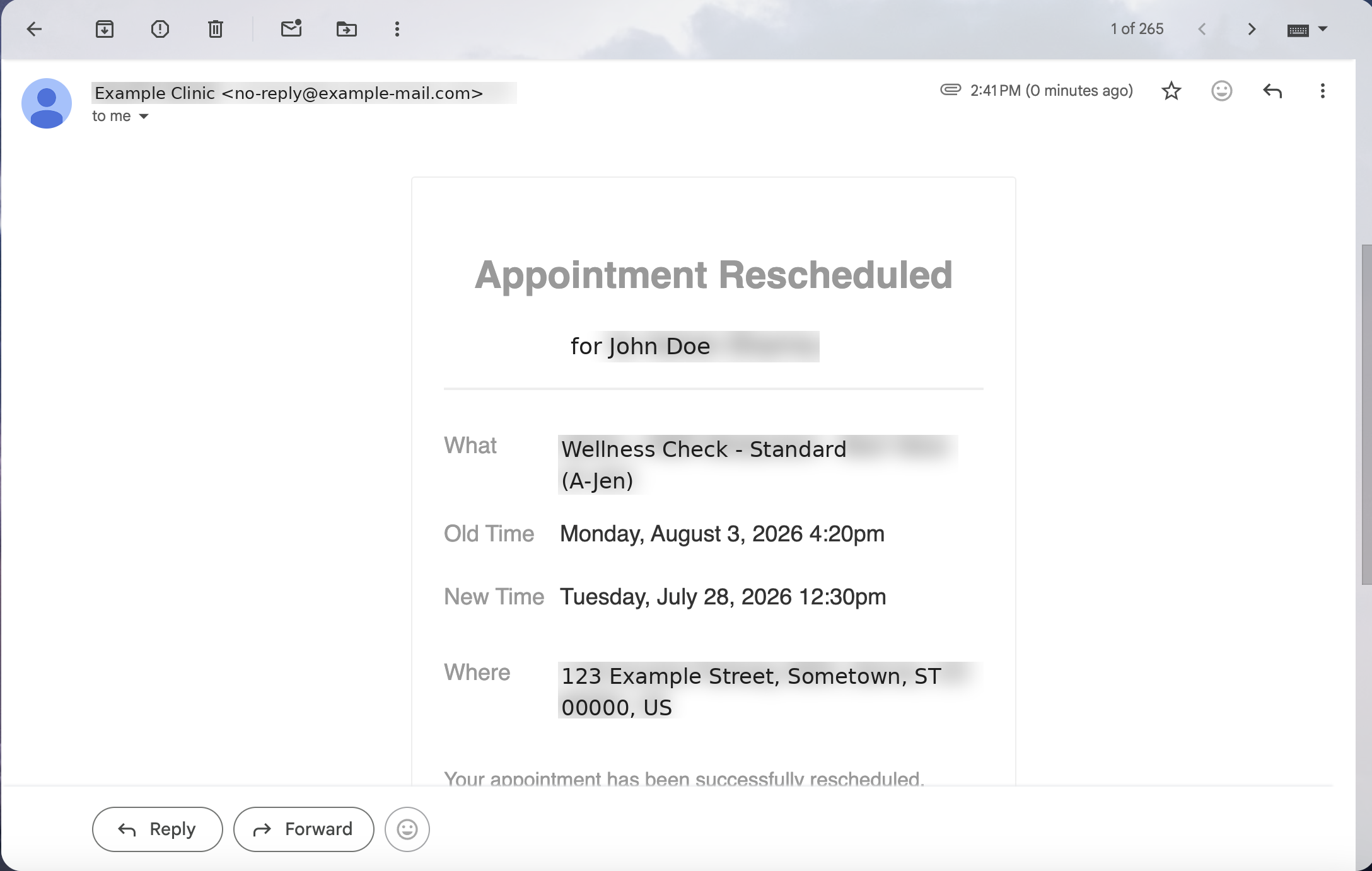
Template 7 — confirmation of the new time (email)
Subject: Confirmed: {service} on {new date} at {new time}. Body: Hi {first name} — you're all set. Your {service} appointment is now {new date} at {new time}{, at location}. Your previous time has been released. Need to adjust again? Same link, same rules: {reschedule link}. See you then — {business name}
The confirmation closes the loop, restates the time in writing, and quietly re-plants the link and the rules for next time. (Tecton sends it automatically the moment a client confirms a new slot.)
Why every template gets shorter with a standalone reschedule link
Here's the friction all seven templates share on stock Acuity Scheduling (formerly Squarespace Scheduling): clients can only reschedule through the link in their original confirmation email, can change date and time only, and one appointment at a time. There is no shareable reschedule page. Every message must route the client back to an email from weeks ago — “find your confirmation from March 3rd” — exactly the kind of instruction people abandon.
A standalone link removes the detour. Tecton Scheduler layers on top of your existing Acuity account — it doesn't replace it — and generates one public, branded reschedule page for your business. Clients verify email and phone (no account or login), pick a new slot from live Acuity availability, pay any late-change fee via Square or Stripe, and get an instant email confirmation. One link, every template, every channel:
- Connect Tecton to your existing Acuity account — appointments and services sync on demand or on a schedule, with credentials encrypted at rest.
- Set your reschedule window and optional fee once in Settings.
- Copy your business's public reschedule link.
- Paste it as {reschedule link} in the seven templates above — and into Acuity's own confirmation and reminder emails.
- Watch reschedules, fees charged, and declined cards roll into the notifications feed.
The mechanics of the link — how verification works and what clients see — are covered in our guide to the standalone Acuity reschedule link. Plans are month-to-month with a free trial on every tier and roughly a 15-minute setup; see pricing.
Put this on autopilot
Tecton Scheduler does this for your Acuity account
Self-serve reschedule links with automatic fees via Square or Stripe, plus revenue, no-show, and demand analytics — synced straight from Acuity Scheduling. Live in about 15 minutes.
Frequently asked questions
What should I say in a reschedule email to a client?
State the change in the first sentence, offer specific new times or a link where the client can pick one, and end with a single ask. Keep it under 125 words, apologize once at most, and put the reschedule link where it can't be missed. The goal is the fastest possible path to a new confirmed time.
How do clients reschedule an appointment booked through Acuity Scheduling?
In stock Acuity, clients can only reschedule through the link in their original confirmation email, and they can change the date and time of one appointment at a time. There is no standalone reschedule page you can text or post. Tools like Tecton Scheduler add a public branded link that works for any appointment, verified by email and phone.
Should I send reschedule messages by email or SMS?
Use both when the appointment is within 24 hours: SMS gets seen fast, email carries the details. For fee notices and policy language, always use email so the client has a written record. For reminders, an SMS with a reschedule link tends to turn silent no-shows into reschedules, because acting takes seconds.
Can I charge a fee when a client reschedules at the last minute?
Yes, provided the client agreed to a clearly disclosed policy before booking. Note that Acuity Scheduling has no reschedule-fee feature at all — its policies only cover cancellations and no-shows, and even those fees must be charged manually. Tecton Scheduler adds a configurable reschedule window and fee, collected automatically through Square or Stripe when the client confirms.
How do I follow up with a client who no-showed?
Send one message within a few hours: note that you missed them, state any no-show fee factually if your policy includes one, and make rebooking one tap with a reschedule link. Skip the guilt trip — most no-shows are forgetfulness or emergencies, and the follow-up that rebooks is worth more than the one that scolds.
Keep reading
Acuity Reschedule Links: How They Work and Their Limits
Acuity's reschedule link is generated per booking and delivered by email — which works until the email is gone. This guide covers what the link can and can't do, the dead ends, and what an always-available reschedule page changes.
Read guideHow to Let Clients Reschedule Their Own Appointments in Acuity
Acuity lets clients reschedule through the link in their confirmation email — but only date and time, only one appointment at a time, and only if they still have the email. This guide covers the settings that control it, why clients get stuck, and how to give them a standalone branded reschedule link.
Read guideCancellation Policy Templates for Appointment Businesses
Six copy-paste cancellation policy templates — gentle, standard, and strict, plus salon, med spa, and fitness versions — with the anatomy of an enforceable policy, where to publish it in Acuity, and how to make enforcement automatic.
Read guideHow to Reduce No-Shows in Acuity Scheduling: 9 Tactics Ranked
Nine no-show tactics for Acuity Scheduling, ranked by impact against effort — from cards on file and reminder timing to self-serve rescheduling and segment-level fixes. Honestly marked: what Acuity does natively, and what needs a layer on top.
Read guide