
How to Charge a Cancellation Fee in Acuity Scheduling
TL;DR
- Acuity Scheduling has no automatic cancellation fee. It can store a card at booking, but someone on your team must manually charge it after every late cancellation.
- The manual flow only works with Stripe or Square as your payment processor — PayPal can't charge stored cards in Acuity.
- A written cancellation policy is required either way: clients must see the fee before they book for it to be enforceable and dispute-proof.
- Tecton Scheduler automates the entire flow on top of Acuity: clients reschedule or cancel through your branded link, and the fee is collected via Square or Stripe the moment they confirm — no manual charging.
To charge a cancellation fee in Acuity Scheduling, you must require a credit card at booking, publish a cancellation policy, and then manually charge the stored card from the appointment details after a late cancellation — Acuity never charges the fee for you. Automating that last step requires a tool layered on top of Acuity, which is exactly what this guide walks through.
Below is the complete setup: the policy language, the card-on-file settings, the manual charge flow with Stripe or Square, the gaps that cost businesses real money, and the automated alternative.
Does Acuity Scheduling charge cancellation fees automatically?
No. Acuity Scheduling can require a card at booking and can block cancellations inside your cutoff window, but it has no setting that charges a fee when a client cancels late or fails to show. The card sits on file; charging it is a human's job — opening the appointment and making a payment against the stored card, as a deliberate action, every single time.
This surprises a lot of owners, because Acuity's no-show prevention features mention cancellation policies and cards on file. Those features exist — but they end at storing the card and displaying the policy. Enforcement is manual, and in a busy week, manual means forgotten.
Reschedules are a separate gap
Acuity has no concept of a reschedule fee at all — its policy settings only address cancellations and no-shows. If you want to charge for late reschedules, see how to charge a reschedule fee in Acuity.
Step 1: Write and publish your cancellation policy
A fee you never disclosed is a chargeback waiting to happen. Before touching payment settings, decide the policy and put it where clients see it before they book:
- Pick a cutoff window. 24 hours is the norm for salons and studios; 48 hours is common for medical, wellness, and high-prep services.
- Pick the fee. Flat fee (e.g. $25) or a percentage of the service (50% is typical for late cancels; up to 100% for no-shows).
- Write it in plain language. One or two sentences beats a page of legalese — e.g. “Cancellations within 24 hours of your appointment are charged 50% of the service price.”
- Publish it everywhere a client acts: your Acuity scheduling page text, booking confirmation emails, and reminder emails.
If you want ready-made wording for different business types, we keep a set of copy-paste policies in our cancellation policy templates guide.
Step 2: Require a card on file in Acuity
In Acuity's payment settings, connect Stripe or Square and set appointments to require a credit card at booking. You can either charge for the appointment upfront or simply hold the card details — for a cancellation-fee policy, holding the card is what matters.
PayPal won't work for this
Acuity supports PayPal for upfront payments, but stored-card charges — the mechanism behind cancellation fees — only work through Stripe or Square. If you're on PayPal, you cannot charge a fee after the fact.
While you're in settings, set your scheduling limits so clients can't self-cancel inside the cutoff window. This forces late changes to come through you (or through a smarter front door — more on that below), which is the only point where a policy can actually be applied.
Step 3: Manually charge the fee after a late cancellation
When a client cancels inside your window, the built-in flow looks like this:
- Open the cancelled appointment in your Acuity calendar.
- Choose the option to make a payment against the client's stored card.
- Enter the fee amount from your policy and process the charge through Stripe or Square.
- Record what you charged and why — Acuity won't tag it as a “cancellation fee” anywhere.
- Follow up with the client so the card charge isn't a surprise (surprises become disputes).
It works. But notice what it depends on: a person seeing the cancellation, remembering the policy, opening the appointment, doing math, charging the card, and communicating — for every late cancellation, forever.
Where the manual approach breaks down
| Acuity built-in (manual) | Automated (Tecton Scheduler) | |
|---|---|---|
| Fee is charged when client cancels/reschedules late | Only if staff remembers and acts | Collected automatically at confirmation |
| Works after hours / weekends | No — waits for a human | Yes — the reschedule link is self-serve, 24/7 |
| Client sees the fee before confirming | No — the charge lands later, often as a surprise | Yes — fee is shown and paid in the flow |
| Fee revenue is tracked and reported | No — it's an untagged payment | Yes — fees appear in your revenue analytics |
| Dispute risk | Higher (post-hoc surprise charge) | Lower (client actively confirms the fee) |
The pattern in appointment businesses is consistent: the policy exists, the card is on file, and the fee still doesn't get charged — because enforcement is a chore that loses to a busy front desk. Many owners are surprised to discover the fee was never going to charge itself: Acuity simply wasn't built to do it.
How to automate cancellation and reschedule fees on top of Acuity
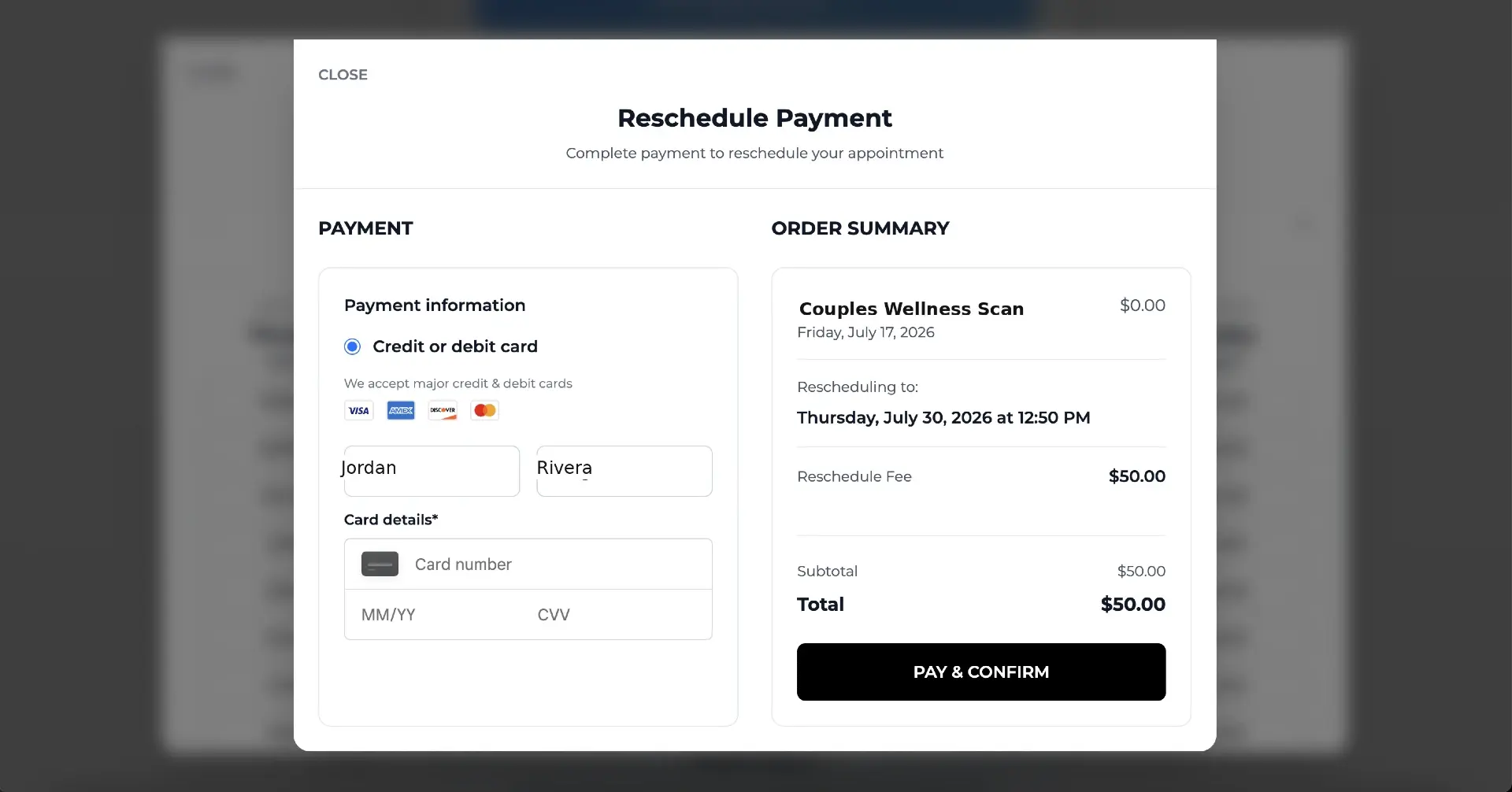
Tecton Scheduler connects to your existing Acuity account and your Square or Stripe account, then gives clients a branded self-serve link to change their own appointments within the rules you set:
- Connect Acuity and your payment provider, and set your reschedule window and fee once in Settings.
- Drop your public reschedule link into Acuity's confirmation and reminder emails.
- Clients open the link, verify their email and phone, and pick a new slot from live Acuity availability — no account, no phone call. See the client reschedule experience.
- If the change falls inside your fee window, the fee is collected through Square or Stripe at confirmation — before the new slot is locked in.
- Every fee lands in your analytics dashboard as tracked revenue, alongside cancellations and no-show trends.
The policy stops being a sign on the wall and becomes a rule the system enforces — evenly, politely, and at 11pm on a Sunday.
Keep the manual flow for edge cases
Automation handles the standard cases; you can still waive or manually charge fees for exceptions. The point is that the default no longer depends on memory.
What should a cancellation fee be? Benchmarks by business type
| Business type | Typical cutoff | Typical late-cancel fee | Typical no-show fee |
|---|---|---|---|
| Hair & beauty salons | 24 hours | 25–50% of service | 50–100% of service |
| Med spas & aesthetics | 48 hours | 50% of service or flat $50+ | 100% of service |
| Fitness & training | 12–24 hours | Flat $15–$25 or session forfeit | Full session |
| Health & wellness clinics | 24–48 hours | Flat $25–$75 | Flat $50–$100 |
| Photography & studios | 48–72 hours | Deposit forfeit | Deposit forfeit |
Two principles hold across industries: the fee should sting enough to change behavior but not enough to lose the client relationship, and a reschedule should always cost less than a cancellation — you want the client to move the appointment, not abandon it. That's the economics behind fee-gated rescheduling: the revenue stays on your calendar.
Put this on autopilot
Tecton Scheduler does this for your Acuity account
Self-serve reschedule links with automatic fees via Square or Stripe, plus revenue, no-show, and demand analytics — synced straight from Acuity Scheduling. Live in about 15 minutes.
Frequently asked questions
Can Acuity Scheduling automatically charge a late cancellation fee?
No. Acuity can require and store a card at booking, but charging a cancellation or no-show fee is always a manual step — a staff member must open the appointment and charge the stored card through Stripe or Square. Automation requires a layer on top of Acuity, such as Tecton Scheduler.
Which payment processors support charging a stored card in Acuity?
Stripe and Square. PayPal can take upfront payments in Acuity but cannot charge a card on file afterwards, so it can't be used to collect cancellation or no-show fees.
Is it legal to charge a cancellation fee?
Generally yes, provided the client agreed to a clearly disclosed policy before booking. Show the policy on your scheduling page and confirmation emails, keep the wording specific about the window and the amount, and keep records. Card networks side with businesses in disputes far more often when the policy was visible at the time of booking.
Should I charge for reschedules too, or only cancellations?
Many businesses charge a smaller fee for late reschedules than for cancellations — enough to discourage churn but cheap enough that clients move the appointment instead of dropping it. Acuity has no built-in reschedule fee at all; Tecton Scheduler adds one on top, collected automatically via Square or Stripe.
What's a reasonable cancellation window?
24 hours is the most common for salons, fitness, and general services; 48 hours for med spas, clinics, and high-preparation appointments. Pick the shortest window that actually gives you time to refill the slot.
Keep reading
How to Charge a No-Show Fee in Acuity Scheduling
Acuity can store a client's card, but a no-show fee is only ever charged by hand — and hand-charged fees get skipped. Here's the manual flow step by step, where it breaks down, and how to automate enforcement and track your no-show rate on top of Acuity.
Read guideHow to Charge a Reschedule Fee in Acuity Scheduling
Acuity has no reschedule fee — it can only block late changes outright. This guide covers why reschedule fees exist, the cancel-and-rebook workaround and where it backfires, how to price a reschedule fee against a cancellation fee, and how to automate collection with Square or Stripe.
Read guideCancellation Policy Templates for Appointment Businesses
Six copy-paste cancellation policy templates — gentle, standard, and strict, plus salon, med spa, and fitness versions — with the anatomy of an enforceable policy, where to publish it in Acuity, and how to make enforcement automatic.
Read guideHow to Charge a Card on File in Acuity (Stripe & Square)
Acuity Scheduling can store a client's card at booking and let you charge it later — but only through Stripe or Square, and only by hand. This guide covers the manual charge flow, the use cases, dispute-proofing, and how to automate the fee scenarios.
Read guide