
How to Charge a No-Show Fee in Acuity Scheduling
TL;DR
- Acuity Scheduling never charges a no-show fee automatically. It can store a card at booking and let you mark the appointment as a no-show, but a person must open the appointment and charge the card by hand.
- Stored-card charges only work with Stripe or Square — PayPal in Acuity handles upfront payments and can't charge a card after the fact.
- Marking an appointment as a no-show triggers nothing: no fee, no alert, no report. Acuity has no no-show-rate report at all.
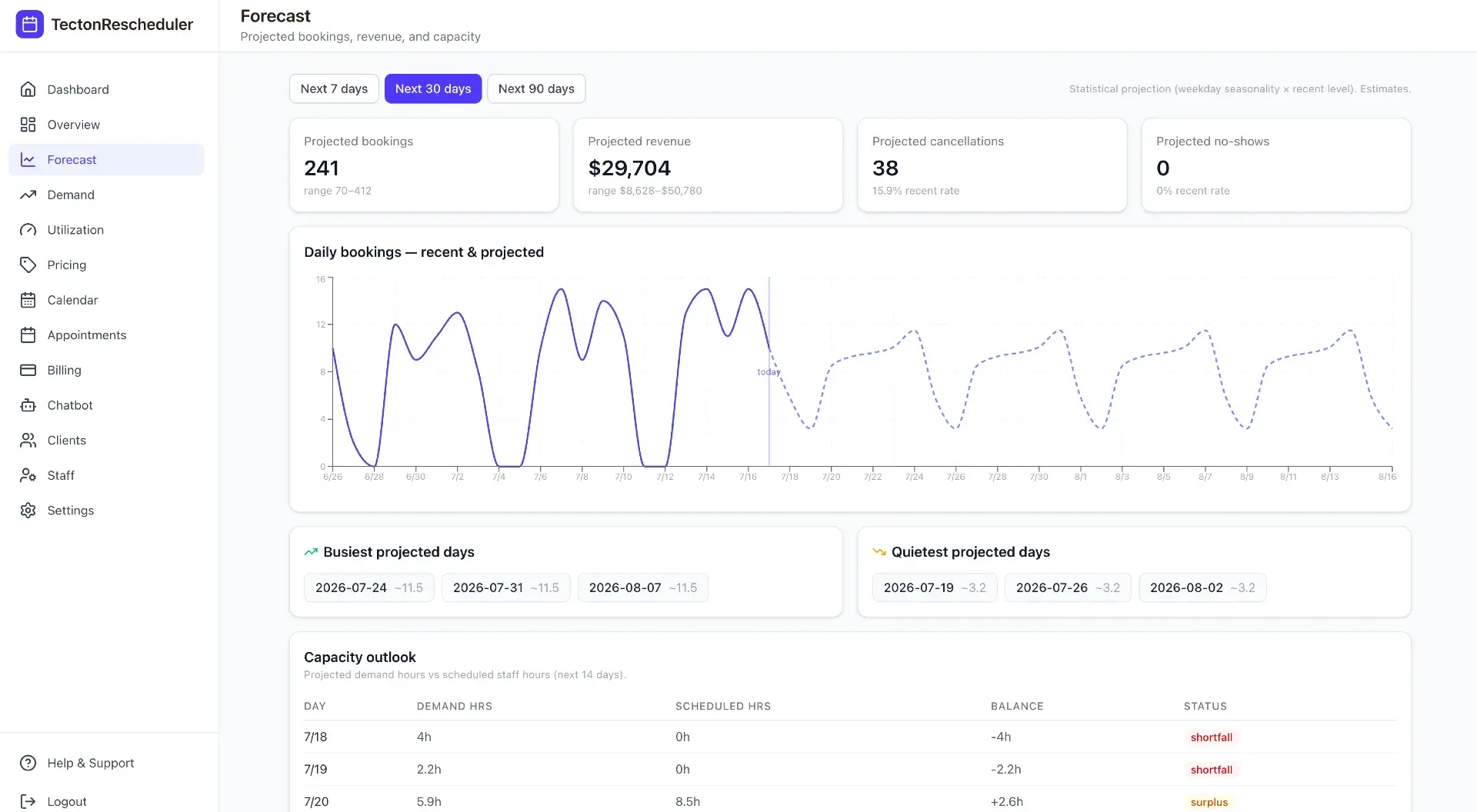
- Tecton Scheduler layers on top of Acuity: a fee-gated self-serve reschedule link turns would-be no-shows into kept revenue, and no-shows are tracked in your analytics with 7/30/90-day forecasts.
To charge a no-show fee in Acuity Scheduling, require a credit card at booking, publish a no-show policy, and then — after the missed appointment — open it in your calendar, mark it as a no-show, and manually charge the stored card through Stripe or Square. Acuity never charges the fee automatically; automating it requires a layer on top.
This guide covers the full setup: the policy wording, the card-on-file settings, the manual charge flow, why it quietly fails in real businesses, what a no-show fee should actually be in your industry, and how to automate both enforcement and tracking.
Does Acuity Scheduling charge no-show fees automatically?
No. Acuity Scheduling (formerly Squarespace Scheduling) gives you three no-show tools: it can require a credit card at booking, it can display your cancellation and no-show policy to clients, and it lets you mark a missed appointment as a no-show. What it does not have is any setting that charges the fee. The card sits on file; a staff member must open the appointment and process a payment against it — deliberately, every single time.
Acuity's built-in prevention features — a card on file at booking, policy text on the booking page, and reminder emails and SMS — do reduce no-shows at the margins. But prevention is not enforcement. When a client still doesn't walk through the door, everything that happens next depends on a human remembering to act.
Marking a no-show is bookkeeping, not billing
Setting an appointment's status to no-show charges nothing — and it removes the appointment from Acuity's revenue report entirely. If your Stripe or Square totals never quite match Acuity's numbers, that exclusion is one reason; see why the Acuity revenue report doesn't match Stripe or Square.
Step 1: Put a no-show policy in front of clients before they book
A no-show fee a client never agreed to is a chargeback with extra steps. Before you touch payment settings, decide the policy and place it everywhere a client acts:
- Set the fee. For no-shows, 50–100% of the service price is the common range — deliberately more than a late-cancel fee, because a no-show gave you zero notice and an unfillable slot.
- Pair it with a cancellation window (24–48 hours is typical) so clients always have a cheaper exit. A no-show fee works best as the top tier of a full cancellation fee policy in Acuity.
- Write it in one plain sentence — e.g. “Missed appointments without notice are charged 100% of the service price to the card on file.”
- Publish it on your Acuity booking page, in the booking confirmation email, and in every reminder — the reminder is the last thing a would-be no-show reads.
If you want ready-made wording for different business types, we keep copy-paste policies in our cancellation policy templates guide.
Step 2: Require a card on file with Stripe or Square
In Acuity's payment settings, connect Stripe or Square and set appointments to require a credit card at booking. You don't have to charge anything upfront — for a no-show fee, storing the card is the point. The client enters card details once, and the card stays attached to their appointment.
PayPal can't do this
PayPal in Acuity handles upfront payments only. It cannot charge a stored card after the fact — which is the entire mechanism behind a no-show fee. If fee enforcement matters to you, connect Stripe or Square.
The mechanics of stored cards, upfront charges, and post-hoc charges are covered in depth in how to charge a card on file in Acuity.
Step 3: Mark the no-show and charge the stored card
When a client misses an appointment, the built-in flow looks like this:
- Open the appointment in your Acuity calendar after the scheduled time has passed.
- Mark it as a no-show. This records the status — it charges nothing.
- Choose the option to make a payment against the client's stored card.
- Enter your no-show fee amount and process the charge through Stripe or Square.
- Record what the charge was for — Acuity won't label it as a no-show fee anywhere in its reporting.
- Message the client before the charge lands. A fee they saw coming is a policy; a fee they discover on a bank statement is a dispute.
Six steps, none of them difficult — and all of them optional in practice, which is exactly the problem.
Why no-show fee enforcement fails in practice
Ask owners with a written no-show policy how often they actually charge it, and the honest answer is usually “sometimes.” The manual flow fails for predictable reasons:
- It's a memory tax. The no-show happens in the middle of a busy day. Charging the fee has to survive until closing time — and then actually happen.
- It's a confrontation. Manually charging a regular's card feels personal, so staff quietly skip it. Every skipped fee trains clients that the policy is a bluff.
- Declined cards vanish. A failed stored-card charge can easily slip by unnoticed — nothing in a manual flow chases it for you. The fee simply evaporates.
- Surprise charges become disputes. A card charged hours after the appointment, with no client interaction, is prime chargeback material.
- Nothing is measured. Acuity has no no-show-rate report, so you can't tell whether the policy is even changing behavior — see how to track your no-show rate.
The result is a policy that exists on paper, a card that exists on file, and revenue that still walks out the door. And because empty slots also carry prep time, staffing, and refill costs, the true cost of no-shows compounds quietly while enforcement stays a chore.
No-show fee vs. deposit vs. prepayment: which protects you best?
A stored-card fee is only one way to protect a slot. The stronger alternatives collect money before the appointment, which removes enforcement from the equation entirely:
| No-show fee (card on file) | Deposit at booking | Full prepayment | |
|---|---|---|---|
| Client pays at booking | Nothing — card is stored | Part of the price (often 20–50%) | The full service price |
| Booking friction | Low | Medium | Highest |
| What happens on a no-show | You charge the stored card manually | Deposit is forfeited — already collected | Nothing to collect — you were paid |
| Enforcement in Acuity | Manual, easy to skip | Automatic — the money is in hand | Automatic — the money is in hand |
| Dispute risk | Higher — post-hoc surprise charge | Lower — client paid knowingly | Lowest |
| Best for | Regulars and low no-show niches | High-prep or high-demand services | First-time clients, premium services |
The pattern is simple: the more you collect upfront, the less enforcement you need — and the more friction you add at booking. Most appointment businesses land on a tiered approach: card on file for regulars, deposits for high-value services, and prepayment for first-time clients in no-show-prone time slots.
How much should a no-show fee be? Typical amounts by industry
| Business type | Typical no-show fee | Common alternative |
|---|---|---|
| Hair & beauty salons | 50–100% of service price | Deposit on higher-ticket services |
| Med spas & aesthetics | 100% of service, or flat $50+ | Deposit or prepayment for new clients |
| Fitness & personal training | Full session price | Session forfeited from a package |
| Health & wellness clinics | Flat $50–$100 | Prepayment for initial consults |
| Photography & studios | Deposit forfeit (often 25–50%) | Non-refundable retainer |
Two principles hold across industries. First, the no-show fee should be your most expensive outcome — more than a late cancellation, more than a reschedule — because it gave you no chance to refill the slot. Second, always leave a cheaper path open: a client who can move an appointment for a small fee usually will, and reducing no-shows beats billing for them every time.
How to automate enforcement and track your no-show rate
You can't fix the manual charge inside Acuity — but you can restructure the problem so fewer no-shows happen and the ones that do are visible. Tecton Scheduler layers on top of your existing Acuity account (it doesn't replace it) and attacks both ends:
- Connect your Acuity account and your Square or Stripe account, then set your reschedule window and fee once in Settings — setup takes about 15 minutes.
- Drop your branded self-serve link into Acuity's confirmation and reminder emails. Clients verify their email and phone — no account, no login — and pick a new time from live Acuity availability. See the client reschedule experience.
- If the change falls inside your fee window, the fee is collected automatically via Square or Stripe before the new slot is confirmed. The would-be no-show becomes a paid reschedule, and the revenue stays on your calendar.
- Every no-show, cancellation, and collected fee lands in the analytics overview, tracked for today, 7 days, 30 days, and the month with prior-period comparisons.
- The forecast projects bookings, revenue, cancellations, and no-shows over 7, 30, and 90 days — so you can see whether your policy is actually bending the curve.
Failed and declined cards — the silent killer of manual fee collection — surface in a read-tracked notifications feed alongside reschedules and fees charged, so nothing evaporates unnoticed.
Test it against real clients first
Every pricing plan includes a free trial and runs month-to-month, so you can put the reschedule link in your reminder emails and watch what happens to your no-show count before committing.
Put this on autopilot
Tecton Scheduler does this for your Acuity account
Self-serve reschedule links with automatic fees via Square or Stripe, plus revenue, no-show, and demand analytics — synced straight from Acuity Scheduling. Live in about 15 minutes.
Frequently asked questions
Can Acuity Scheduling automatically charge a no-show fee?
No. Acuity can require and store a credit card at booking, but charging a no-show fee is always manual — a staff member opens the appointment and charges the stored card through Stripe or Square. No Acuity setting automates it; automation requires a tool layered on top, such as Tecton Scheduler.
What happens when I mark an appointment as a no-show in Acuity?
The appointment's status changes — nothing else. No fee is charged, no alert goes out, and the appointment is excluded from Acuity's revenue report. If you want to collect a fee, you still have to open the appointment and charge the stored card manually through Stripe or Square.
How much should a no-show fee be?
Most appointment businesses charge 50–100% of the service price for a no-show — more than a late cancellation, because a no-show gives you no chance to refill the slot. Flat fees of $50–$100 are common in clinics; salons and personal trainers often charge the full service or session price.
Can I charge a no-show fee through PayPal in Acuity?
No. PayPal in Acuity only handles upfront payments at booking — it cannot charge a stored card after the appointment. To collect no-show or cancellation fees against a card on file, you need Stripe or Square connected as your payment processor.
Should I require prepayment instead of charging no-show fees?
Prepayment removes enforcement entirely — you already have the money — but it adds friction at booking and can cost you first-time bookings. A common middle path is tiered: card on file for regulars, deposits for high-value services, and prepayment for new clients or no-show-prone time slots.
Does Acuity Scheduling track my no-show rate?
No. Acuity has no no-show-rate report, and its revenue report excludes no-show appointments entirely, so measuring your rate means counting by hand. Tecton Scheduler tracks no-shows across today, 7-day, 30-day, and monthly windows with prior-period comparisons, plus a 7, 30, and 90-day forecast.
Keep reading
How to Charge a Cancellation Fee in Acuity Scheduling
Acuity can hold a card on file, but charging a late-cancellation fee is a manual, easy-to-forget process. This guide covers the built-in way step by step, where it breaks down, and how to automate fee collection with Square or Stripe.
Read guideHow to Charge a Card on File in Acuity (Stripe & Square)
Acuity Scheduling can store a client's card at booking and let you charge it later — but only through Stripe or Square, and only by hand. This guide covers the manual charge flow, the use cases, dispute-proofing, and how to automate the fee scenarios.
Read guideHow to Reduce No-Shows in Acuity Scheduling: 9 Tactics Ranked
Nine no-show tactics for Acuity Scheduling, ranked by impact against effort — from cards on file and reminder timing to self-serve rescheduling and segment-level fixes. Honestly marked: what Acuity does natively, and what needs a layer on top.
Read guideWhat No-Shows Actually Cost Your Appointment Business
No-shows per week × average ticket × 52 is the direct annual loss — and it's only the floor. This guide runs the math for a salon, a med spa, and a fitness studio, then covers the three levers that recover the revenue.
Read guide