
How to Track Your No-Show Rate in Acuity Scheduling
TL;DR
- Acuity Scheduling has no no-show-rate report. You can mark individual appointments as no-shows, but nothing in Acuity aggregates them or calculates a rate — and the built-in revenue report excludes them entirely.
- The DIY method: mark every missed appointment consistently, export your appointments each period, and compute no-shows ÷ booked appointments × 100 in a spreadsheet, segmented by service, day, and staff.
- Typical no-show rates run roughly 5–20% depending on industry — but your month-over-month trend matters far more than any benchmark.
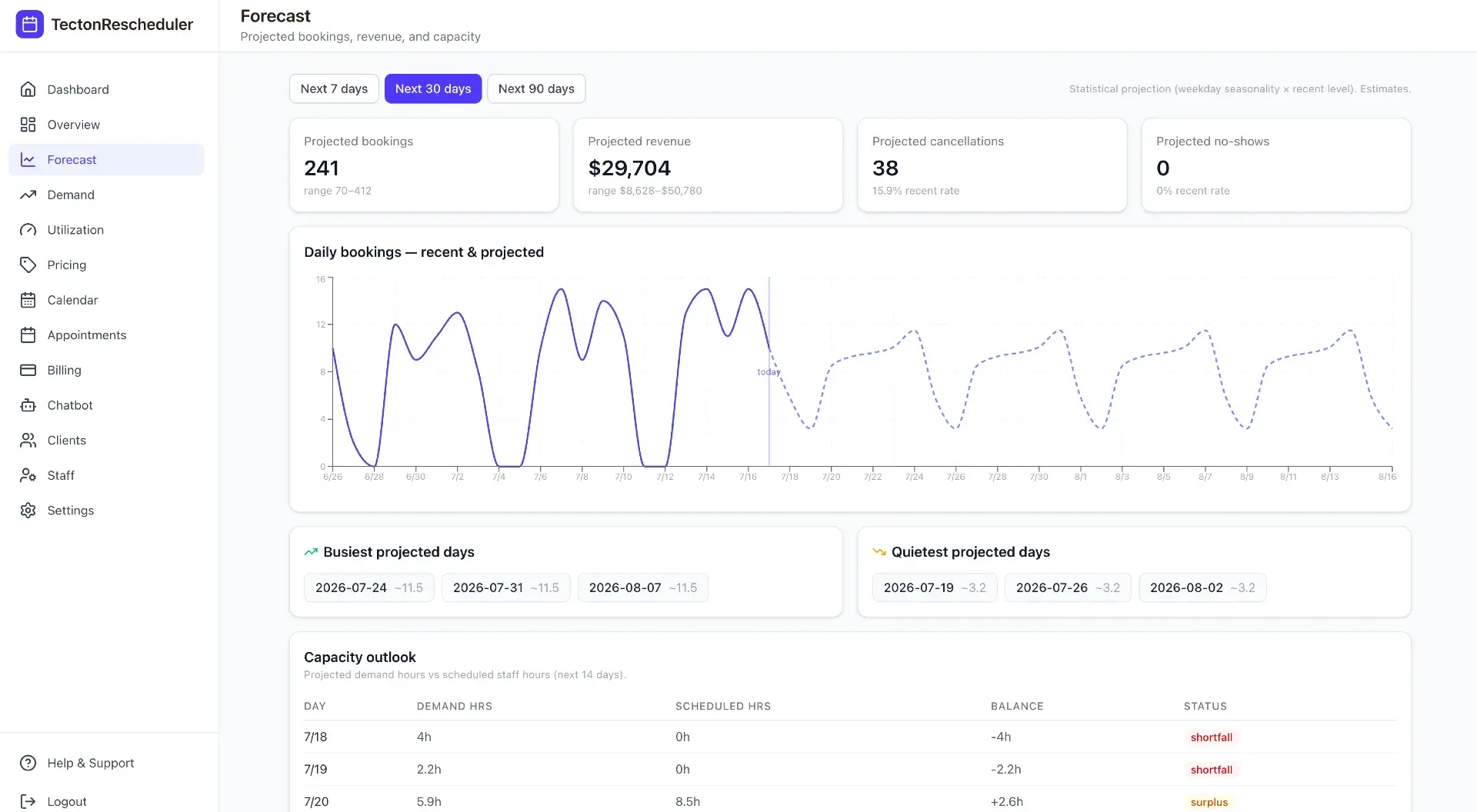
- Tecton Scheduler layers on your existing Acuity account and tracks no-shows automatically: today, 7-day, 30-day, and month views with prior-period comparisons, plus a 7/30/90-day forecast.
Acuity Scheduling doesn't calculate your no-show rate — there is no report for it. To track it, mark every missed appointment as a no-show in Acuity, export your appointment list each period, and compute no-shows ÷ booked appointments × 100 in a spreadsheet. Or layer an analytics tool like Tecton Scheduler on top of Acuity to track it automatically.
This guide covers all of it: the marking discipline that makes any tracking possible, the export-and-spreadsheet method with the exact formula, what a healthy rate looks like by industry, where the manual method falls apart, and how to automate the whole thing.
Does Acuity Scheduling track no-show rates?
No. Acuity Scheduling (formerly Squarespace Scheduling) lets you mark an appointment as a no-show, and its prevention toolkit — cards on file, cancellation policy text, reminder emails and SMS — is real. But there is no report that counts no-shows or calculates a rate. No cancellation analytics either. The status lives on each individual appointment, and nothing aggregates it.
Worse, the one report Acuity does ship actively hides the problem: the built-in revenue report excludes cancelled and no-show appointments from its totals. Your numbers look healthier than your calendar actually was, because the appointments that cost you money simply vanish from the reporting. We break down everything Acuity does and doesn't report in our guide to Acuity Scheduling reports.
This is also why your revenue report never matches Stripe
Excluded no-shows and cancellations — plus manually-marked-paid appointments and refunds — are the usual culprits when Acuity's revenue totals drift from your processor's. See why the Acuity revenue report doesn't match Stripe or Square.
How to mark no-shows in Acuity so the data is usable
Any no-show rate is only as good as your marking discipline. If half your team cancels missed appointments and the other half marks them no-show, your rate is fiction. Fix the process before touching a spreadsheet:
- Define what counts. A no-show never arrived and never told you. A late cancellation gave notice, just not enough to refill the slot. Keep the two statuses distinct — they have different causes and different fixes.
- Mark, don't cancel or delete. When a client doesn't arrive, mark the appointment as a no-show in Acuity. Cancelling it merges it into a different bucket; deleting it destroys the record entirely.
- Do it same-day. An end-of-day sweep takes two minutes. Reconstructing last month's no-shows from memory takes an afternoon and produces guesses.
- Assign one owner per calendar or location. Shared responsibility is how appointments fall through — one person closes out each day's schedule.
- Write the rule down. Two sentences in your front-desk playbook (“no arrival and no contact = mark no-show, same day”) beats re-litigating it every week.
Deleted appointments poison your rate twice
A deleted no-show disappears from both the numerator and the denominator, so your rate reads lower than reality while the lost revenue stays just as real. If it happened, it stays on the record.
How to calculate your no-show rate from an Acuity export
The formula is simple: no-show rate = (no-shows ÷ booked appointments) × 100. “Booked” means every appointment scheduled to happen in the period — completed ones plus the no-shows themselves. Appointments cancelled well in advance can be excluded, since those slots had a chance to be refilled.
- Export your appointment list from Acuity for the period you're measuring (a month is the practical unit) as a CSV or spreadsheet.
- Open it in Google Sheets or Excel and confirm the export includes an appointment status or a way to identify no-shows, plus service, date, and calendar/staff columns.
- Count the no-shows — a filter or a formula like
=COUNTIF(status_range, "no-show")does it. - Count total booked appointments for the same period (again: include the no-shows, exclude early cancellations).
- Divide and multiply by 100. If you booked 200 appointments and 14 were no-shows, your rate is 7%.
- Segment it with a pivot table: rate by service, by day of week, and by staff member or calendar. This is where the actionable findings live.
- Log the headline number in a running tracker each month so you can see the trend, not just the snapshot.
The segments matter more than the headline
A 7% overall rate can hide a 25% rate on one service, one weekday morning, or one provider. The overall number tells you whether you have a problem; the segments tell you where it is.
What's a healthy no-show rate? Typical ranges by industry
There is no universal standard, and published figures vary widely by methodology. The ranges below reflect what appointment businesses commonly report — treat them as orientation, not lab-grade statistics:
| Business type | Typical no-show rate | Common drivers |
|---|---|---|
| Hair & beauty salons | 5–10% | New clients, peak Saturday slots, no card on file |
| Med spas & aesthetics | 3–8% | Lower when deposits or cards on file are required |
| Massage & spa | 5–10% | Long lead times between booking and appointment |
| Fitness & personal training | 10–20% | Low or no per-session cost, habitual skippers |
| Health & wellness clinics | 10–20% | Long lead times, free or insurance-covered visits |
Three patterns hold almost everywhere: new clients no-show more than repeat clients, longer lead times mean higher no-show risk, and appointments with money attached — deposits, cards on file, prepayment — get missed less. And whatever your absolute number, the trend is the real signal: a rate that climbs two or three months in a row is a problem at 5% just as much as at 15%.
If you want to put a dollar figure on your rate — usually the fastest way to get the team taking the marking discipline seriously — work through what no-shows actually cost your business.
Where the export-and-spreadsheet method breaks down
The spreadsheet method works, and if you run it faithfully every month you're ahead of most Acuity businesses. But it has structural weaknesses that show up exactly when the number matters most:
- It's backward-looking. You learn March was a bad month in April, after the empty slots already happened.
- It's manual, so it gets skipped. The export-filter-pivot ritual loses to a busy week, and a tracker with gaps can't show a trend.
- Segmentation is a chore. Rate by service by weekday by staff means rebuilding pivots every period — so most people stop at the headline number.
- Definitions drift. Staff turnover and inconsistent marking quietly change what the number means from one quarter to the next.
- There's no forward view. A spreadsheet can't tell you what next month's no-shows are likely to look like.
| Acuity export + spreadsheet | Tecton Scheduler | |
|---|---|---|
| Effort per period | Export, formulas, pivots — every month | None — syncs from Acuity on demand or on a schedule |
| Freshness | As of your last export | Today, last 7 days, last 30 days, and month views |
| Trend context | Only if you build and maintain a tracker | Prior-period comparisons and sparklines built in |
| Segmentation | Manual pivot tables | Demand heatmap by day and hour plus service mix ranking |
| Forward view | None | No-show forecast for 7/30/90 days with ranges |
How to track your no-show rate automatically with Tecton Scheduler
Tecton Scheduler layers on top of your existing Acuity Scheduling account — it doesn't replace it. It syncs your appointments and services from Acuity on demand or on a schedule, then does the counting you'd otherwise do in a spreadsheet:
- The no-show analytics dashboard shows no-shows for today, the last 7 days, the last 30 days, and the month — with prior-period comparisons and sparklines, alongside bookings, cancellations, revenue, average ticket, and new clients.
- The demand heatmap breaks activity down by day and hour, so the “Monday 9am problem” is visible instead of buried in a pivot table.
- The booking and no-show forecast projects no-shows (plus bookings, revenue, and cancellations) over 7, 30, and 90 days with ranges and your busiest and quietest days — the forward view a spreadsheet can't give you.
- The notifications feed keeps reschedules, fees charged, and failed cards in one read-tracked stream, so schedule changes don't slip past you.
Measurement is half the value; the other half is that the same tool acts on the number. Tecton gives clients a branded self-serve reschedule link that pulls live Acuity availability — so a client who would have silently skipped can move the appointment instead, with an optional fee collected via Square or Stripe at confirmation. Your no-show rate goes down because reschedules go up. Every plan is month-to-month with a free trial and about 15 minutes of setup — see pricing.
Tracking and reducing are different jobs
Once you can see the rate, work it down deliberately: reminders, cards on file, deposits, and fee-gated rescheduling all have their place. Start with our playbook on reducing no-shows in Acuity Scheduling and the setup guide for charging a no-show fee in Acuity.
Put this on autopilot
Tecton Scheduler does this for your Acuity account
Self-serve reschedule links with automatic fees via Square or Stripe, plus revenue, no-show, and demand analytics — synced straight from Acuity Scheduling. Live in about 15 minutes.
Frequently asked questions
Does Acuity Scheduling have a no-show report?
No. Acuity lets you mark individual appointments as no-shows, but it has no report that counts them or calculates a rate — and its built-in revenue report excludes no-show and cancelled appointments entirely. To get a rate, export your appointments and calculate it in a spreadsheet, or use an analytics layer like Tecton Scheduler on top of Acuity.
How do I calculate my no-show rate?
Divide your no-shows by total booked appointments for the same period, then multiply by 100. If you booked 200 appointments last month and 14 were marked no-show, your rate is 7%. Include the no-shows in the booked total, exclude appointments cancelled well in advance, and log the number monthly so you can see the trend.
Do late cancellations count as no-shows?
Track them separately. A no-show never arrived and never told you; a late cancellation gave notice, just not enough time to refill the slot. Some businesses also watch a combined lost-appointment rate, but keeping the two statuses distinct tells you which problem you actually have — and they respond to different fixes.
What is a good no-show rate?
Commonly reported ranges run from roughly 5–10% for salons and spas to 10–20% in fitness and clinic settings, with businesses that require deposits or cards on file at the low end. There is no universal standard — the more useful test is your own trend. A rate climbing for consecutive months is a problem at any level.
Can Acuity charge a no-show fee automatically?
No. Acuity can require and store a card at booking, but charging a no-show fee is always manual: a staff member opens the appointment and charges the stored card through Stripe or Square. PayPal cannot charge cards on file in Acuity. Tecton Scheduler automates fee collection for self-serve reschedules on top of Acuity.
How often should I review my no-show rate?
Monthly is the minimum for a trustworthy trend, and it is also the practical ceiling for the manual export-and-spreadsheet method. Higher-volume businesses benefit from weekly checks so they can react within the same month. Tecton Scheduler shows no-show counts for today, the last 7 and 30 days, and the month, with prior-period comparisons.
Keep reading
How to Reduce No-Shows in Acuity Scheduling: 9 Tactics Ranked
Nine no-show tactics for Acuity Scheduling, ranked by impact against effort — from cards on file and reminder timing to self-serve rescheduling and segment-level fixes. Honestly marked: what Acuity does natively, and what needs a layer on top.
Read guideWhat No-Shows Actually Cost Your Appointment Business
No-shows per week × average ticket × 52 is the direct annual loss — and it's only the floor. This guide runs the math for a salon, a med spa, and a fitness studio, then covers the three levers that recover the revenue.
Read guideAcuity Scheduling Reports Explained — and 7 Things They Miss
Acuity Scheduling's built-in reporting covers appointment counts, booked revenue, and CSV export — and misses no-show rates, cancellation analytics, forecasting, demand patterns, and promotion measurement. This pillar guide breaks down all seven gaps and the spreadsheet-versus-dashboard way to fill each one.
Read guideHow to Charge a No-Show Fee in Acuity Scheduling
Acuity can store a client's card, but a no-show fee is only ever charged by hand — and hand-charged fees get skipped. Here's the manual flow step by step, where it breaks down, and how to automate enforcement and track your no-show rate on top of Acuity.
Read guide