
How to Charge a Reschedule Fee in Acuity Scheduling
TL;DR
- Acuity Scheduling has no reschedule fee. Its scheduling limits can block clients from rescheduling inside a cutoff window, but no setting attaches a charge to the change.
- The common workaround — cancel the appointment, manually charge the stored card, rebook by hand — is slow, staff-dependent, and shows up as a cancellation in your reports.
- A reschedule fee should be cheaper than your cancellation fee: the goal is to keep the revenue on your calendar, not punish the client into abandoning it.
- Tecton Scheduler layers fee-gated self-serve rescheduling on top of Acuity: clients pick a new slot from live availability, and the fee is collected via Square or Stripe before the change is confirmed.
Acuity Scheduling cannot charge a reschedule fee — the feature does not exist. Its scheduling limits can block clients from rescheduling inside a cutoff window, but no setting attaches a payment to the change. To collect a fee for late reschedules, you need either a manual cancel-and-rebook workaround or a tool layered on top of Acuity that gates the new slot behind a payment.
This guide covers why reschedule fees exist in the first place, what Acuity (formerly Squarespace Scheduling) actually offers, the workaround most businesses try and where it goes wrong, how a reschedule fee should be priced against a cancellation fee, and how to automate the whole flow.
Does Acuity Scheduling have a reschedule fee?
No. Acuity's policy tooling addresses cancellations and no-shows — cards on file, policy text on the scheduling page, reminder emails. Rescheduling isn't in that model at all. The only lever Acuity gives you is a blunt one: scheduling limits that prevent clients from self-rescheduling inside your cutoff window. Blocked or free — there is no paid middle ground.
It's also worth knowing how rescheduling works in Acuity to begin with: clients reschedule through the link in their confirmation email, they can change the date and time only, and they handle one appointment at a time. There's no standalone reschedule portal you can post on your website — we cover the mechanics in our guide to Acuity's reschedule link.
Cancellation fees are manual too
Even for cancellations and no-shows, Acuity never charges the stored card automatically — a staff member must open the appointment and charge it through Stripe or Square. See how to charge a cancellation fee in Acuity for that full flow.
Why charge for rescheduling at all?
A reschedule feels harmless — the client is still coming, after all. But a late reschedule carries most of the same costs as a late cancellation:
- Prep time is already spent. Room setup, product pulled, records reviewed, staffing arranged — none of that transfers to the new date.
- The vacated slot rarely refills. A slot abandoned 3 hours out is usually just dead time; you absorb the same refill risk as a cancellation.
- Serial reschedulers compound the damage. A client who moves the same appointment three times has occupied three slots to deliver one appointment's revenue.
- Free rescheduling trains the behavior. When moving an appointment costs nothing at any hour, clients treat your calendar as a draft.
The goal of a reschedule fee isn't the fee revenue — it's the incentive. A small, disclosed charge makes clients think twice about last-minute changes while still leaving them a much cheaper path than cancelling outright. Businesses that quantify what empty slots actually cost them (see the real cost of no-shows) tend to stop giving late changes away for free.
The workaround: treat a late reschedule as a cancel plus rebook
Since Acuity has no reschedule fee, the workaround owners land on is to force late changes through the front desk and process them as a cancellation with a fee, followed by a fresh booking:
- Use Acuity's scheduling limits to block self-rescheduling inside your cutoff window, so late changes have to come through you.
- When a client asks to move a late appointment, cancel it in Acuity.
- Manually charge the stored card for your fee through Stripe or Square (this is the same manual flow as a cancellation fee).
- Rebook the client into the new slot by hand, or send them back through your booking page.
It technically works, but it leaks in four places. It depends on a human being available — a client texting at 9pm to move tomorrow's 8am appointment gets no self-serve path, and often no fee. It reads as a cancellation in your records, and since Acuity's Revenue report excludes cancelled appointments, your reporting drifts further from reality with every workaround. The card charge lands after the fact, which is exactly the surprise pattern that generates disputes. And the friction cuts both ways: make moving an appointment annoying enough and some clients simply cancel — or stop booking.
PayPal can't do this at all
Charging a stored card in Acuity only works with Stripe or Square. PayPal handles upfront payments only — if PayPal is your processor, there is no card to charge after the fact, and the workaround is a dead end.
Reschedule fee vs. cancellation fee: which should cost more?
The cancellation fee, and it isn't close. A cancellation removes revenue from your calendar entirely; a reschedule keeps it — just later. Your fee structure should reflect that difference, because clients respond to the price gap:
| Late reschedule | Late cancellation | |
|---|---|---|
| Service revenue | Kept — moves to a new date | Lost unless the slot refills |
| Refill risk on the vacated slot | Same as a cancellation | Same |
| Client relationship | Intact — they're still coming | Weakened; next booking uncertain |
| Sensible fee level | Small: enough to deter, cheap enough to choose | Larger: typically 25–50% of the service |
Done right, your policy forms a gradient: early changes are free, a late reschedule costs a little, a late cancellation costs a lot, and a no-show costs the most (see how to charge a no-show fee in Acuity). Every step nudges the client toward the outcome you prefer — and the outcome you prefer is almost always keep the appointment, move the date.
Price the reschedule to be chosen
If your cancellation fee is 50% of the service, a reschedule fee of a flat $10–$25 makes rescheduling the obvious rational choice. If the two fees are similar, you've accidentally priced clients into cancelling.
How to add an automatic reschedule fee on top of Acuity
Tecton Scheduler layers on top of your existing Acuity account — it doesn't replace it. It syncs your appointments and services from Acuity, then gives clients a branded self-serve reschedule page where your fee policy is enforced by the system, not by whoever answers the phone:
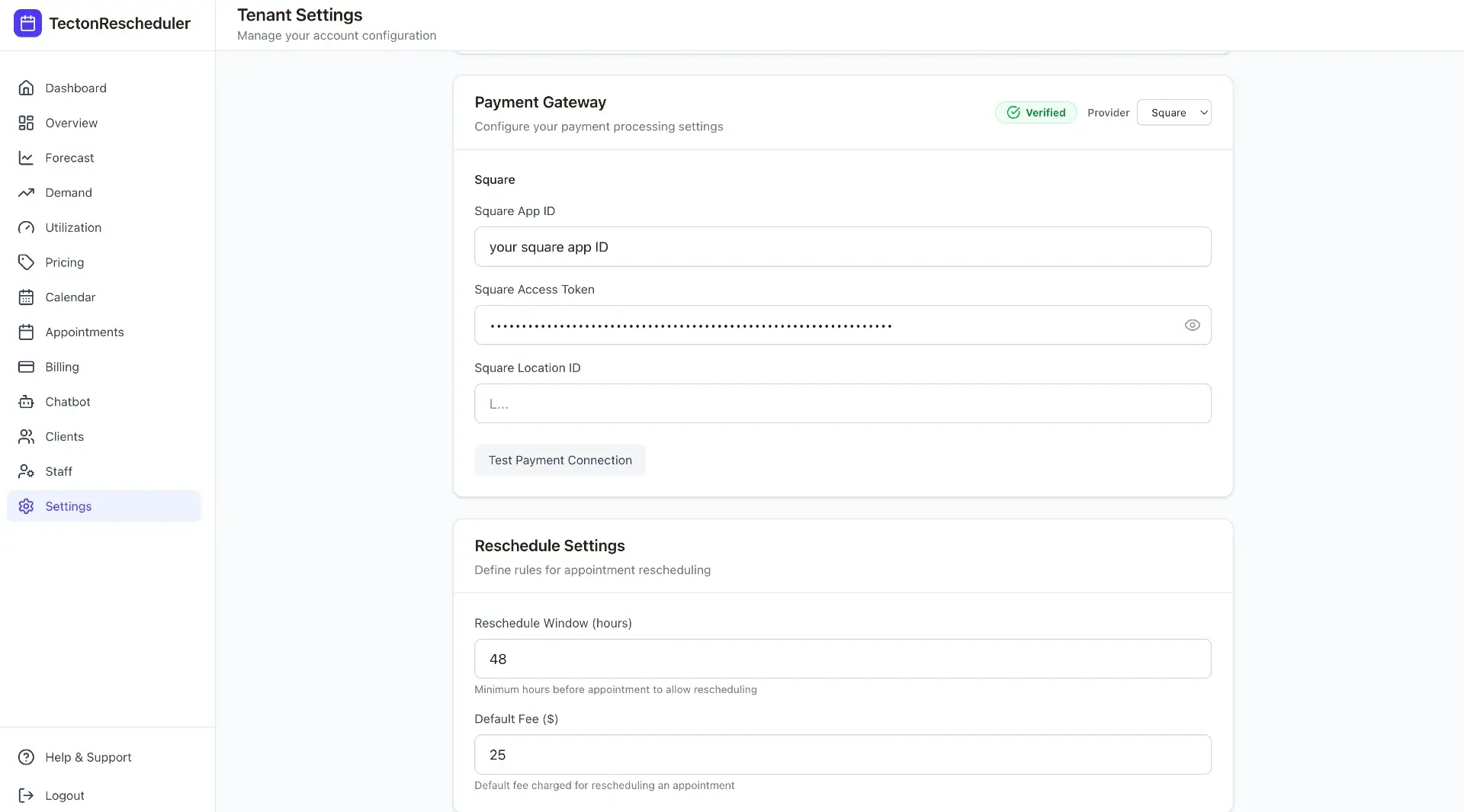
- Connect your Acuity account and your Square or Stripe account, then set your reschedule window and fee once in Settings.
- Drop your public branded reschedule link into Acuity's confirmation and reminder emails — unlike Acuity's per-email link, it's one URL you can share anywhere.
- Clients open the link, verify their email and phone (no account or login), and pick a new slot from live Acuity availability — the full flow is on our client reschedule experience page.
- If the change falls inside your fee window, the fee is collected via Square or Stripe at confirmation — the new slot isn't locked in until the payment clears.
- The client gets an instant email confirmation, and the reschedule, the fee charged, and any failed or declined card land in your notifications feed.
Because every fee is collected in-flow, it's also tracked — reschedule fee revenue shows up in your booked-vs-collected revenue analytics instead of disappearing into untagged Stripe charges. And because the client actively confirms the fee before paying, the dispute-prone surprise-charge pattern goes away.
Setup takes about 15 minutes, every plan starts with a free trial, and billing is month-to-month — see pricing.
What should a reschedule fee be? Typical benchmarks
There's no universal number, but the ranges below are common across appointment businesses. Note the pattern: the reschedule fee is consistently a fraction of the cancellation fee.
| Business type | Typical cutoff | Typical late-reschedule fee | Typical late-cancel fee (for contrast) |
|---|---|---|---|
| Hair & beauty salons | 24 hours | Flat $10–$25 | 25–50% of service |
| Med spas & aesthetics | 48 hours | Flat $25–$50 | 50% of service or flat $50+ |
| Fitness & training | 12–24 hours | Flat $5–$15, often free once | Flat $15–$25 or session forfeit |
| Health & wellness clinics | 24–48 hours | Flat $10–$35 | Flat $25–$75 |
| Photography & studios | 48–72 hours | Flat $50+ or partial deposit | Deposit forfeit |
Three principles travel well across industries. First, grace for the first offense — many businesses waive the first late reschedule per client, which preserves goodwill while keeping the policy's teeth for repeat offenders. Second, disclose before booking: a fee the client never saw is a chargeback waiting to happen, so put the policy on your scheduling page and in confirmation emails (our cancellation policy templates include reschedule clauses you can copy). Third, keep it flat — a flat dollar amount is easier to disclose, easier to justify, and easier to collect than a percentage on a fee this small.
Put this on autopilot
Tecton Scheduler does this for your Acuity account
Self-serve reschedule links with automatic fees via Square or Stripe, plus revenue, no-show, and demand analytics — synced straight from Acuity Scheduling. Live in about 15 minutes.
Frequently asked questions
Can Acuity Scheduling charge a fee when a client reschedules?
No. Acuity has no reschedule fee feature at all — its policies only cover cancellations and no-shows, and even those fees must be charged manually. Scheduling limits can block a client from rescheduling inside your cutoff window, but they cannot attach a payment to the change. Charging for reschedules requires a tool layered on top of Acuity.
Can I block clients from rescheduling too close to the appointment in Acuity?
Yes. Acuity's scheduling limits let you prevent client self-cancellation and self-rescheduling inside a cutoff window you choose. The limitation is that blocking is all you get: the client can't pay a fee to make the change, so late changes turn into phone calls and emails your staff must handle by hand.
Should a reschedule fee be higher or lower than a cancellation fee?
Lower — usually a small flat amount against a percentage-based cancellation fee. A reschedule keeps the revenue on your calendar while a cancellation removes it, so you want the price gap to push clients toward moving the appointment rather than dropping it. If both fees are similar, clients have no reason not to cancel.
How do clients reschedule an Acuity appointment in the first place?
Through the link in their confirmation email. They can change the date and time only, one appointment at a time, and Acuity offers no standalone reschedule portal you can post on your site. Tecton Scheduler adds a public branded reschedule page on top of Acuity where clients verify their email and phone and pick from live availability.
Do I need a card on file to charge a reschedule fee?
For the manual cancel-and-rebook workaround, yes — and only Stripe or Square can charge a stored card in Acuity; PayPal cannot. With an automated layer like Tecton Scheduler, no stored card is needed: the client pays the fee through Square or Stripe inside the reschedule flow, before the new slot is confirmed.
Keep reading
How to Charge a Cancellation Fee in Acuity Scheduling
Acuity can hold a card on file, but charging a late-cancellation fee is a manual, easy-to-forget process. This guide covers the built-in way step by step, where it breaks down, and how to automate fee collection with Square or Stripe.
Read guideHow to Charge a No-Show Fee in Acuity Scheduling
Acuity can store a client's card, but a no-show fee is only ever charged by hand — and hand-charged fees get skipped. Here's the manual flow step by step, where it breaks down, and how to automate enforcement and track your no-show rate on top of Acuity.
Read guideHow to Let Clients Reschedule Their Own Appointments in Acuity
Acuity lets clients reschedule through the link in their confirmation email — but only date and time, only one appointment at a time, and only if they still have the email. This guide covers the settings that control it, why clients get stuck, and how to give them a standalone branded reschedule link.
Read guideAcuity Reschedule Links: How They Work and Their Limits
Acuity's reschedule link is generated per booking and delivered by email — which works until the email is gone. This guide covers what the link can and can't do, the dead ends, and what an always-available reschedule page changes.
Read guide