
How to Increase Average Ticket Value in Your Booking Flow
TL;DR
- The booking flow is your highest-leverage upsell moment: the customer has already decided to buy and is minutes from paying.
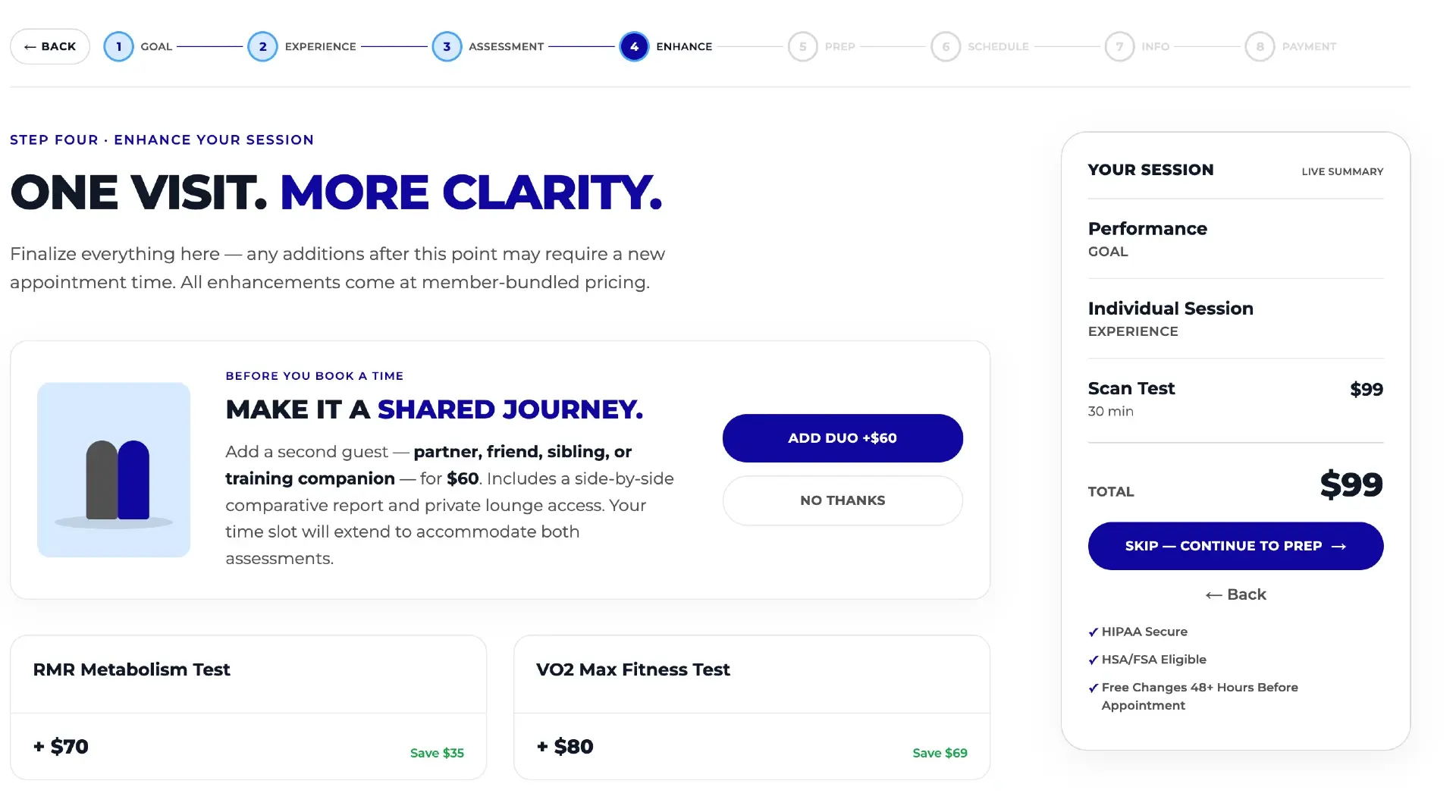
- The biggest wins are structural: add-ons at the decision point, bundles with the savings shown, and intent-based recommendations for customers who don't know what to book.
- Transparency helps: a persistent price summary with bundle savings makes customers more comfortable adding to their order.
- The standard Acuity embed has a largely fixed flow; a custom booking flow synced with Acuity implements all of these tactics.
- Track average ticket per period in your Acuity analytics dashboard so you know which changes moved the number.
To increase average ticket value in your booking flow, put add-ons at the moment a customer selects a service, bundle complementary services with the savings shown, recommend based on the customer's stated goals, educate inside the flow, and keep a running price summary visible — then measure average ticket per period to confirm it worked.
This guide ranks those tactics by impact, and is honest about which the standard Acuity Scheduling embed supports versus which require a custom flow.
Why is the booking flow the best place to upsell?
Every other upsell channel — ads, emails, front-desk suggestions — has to win the customer's attention first. The booking flow doesn't. The person moving through it has already decided to buy, has picked a time, and is about to enter a card. Purchase intent will never be higher.
There's a second reason: relative framing. A $25 add-on pitched by itself in an email is a new purchase decision. The same add-on next to a $150 service the customer just selected reads as a small increment on a decision already made.
Filling the calendar isn't the same as growing it
If your calendar is close to full, raising average ticket is often the only way revenue grows — and it costs nothing in extra hours or staff. Protecting existing bookings matters too: see what no-shows actually cost.
Tactic 1: Put add-ons at the decision point, not on a separate page
The highest-impact change is the simplest: show relevant add-ons on the same screen where the customer selects their service, not buried in a separate category or appointment type they'd have to book on their own.
An add-on hidden behind an extra click competes for attention it will never get — customers in a booking flow are heading toward checkout, not browsing. One sitting next to the service they just chose asks a single question: “want this too, while you're here?” Committed buyers often answer yes.
In the standard Acuity embed, add-ons exist but how they appear is largely dictated by the fixed flow — you generally can't control which add-ons show against which service, in what order, or with what supporting content. A custom scheduler makes add-on placement a design decision you own.
Tactic 2: Bundle complementary services — and show the savings
Bundling changes the unit of purchase. A customer who came for one service is offered a curated combination at a modest discount — an incentive, and a signal that these services belong together.
The critical word is show. A bundle whose savings are implied (“package pricing available!”) converts far worse than one that displays the math: individual prices, bundle price, amount saved. If the customer has to compute the benefit, most won't.
Illustrative math: why bundles move the average fast
Purely as an illustration: if your average ticket is $120 and one in five customers upgrades to a $200 bundle, the average rises to $136 — about 13% from a single change. Real numbers will differ; the point is that bundle take-rate is a high-leverage variable.
If you run promotional pricing on bundles, promotions tracking ties each promotion to its booking and revenue impact.
Tactic 3: Ask about goals, then recommend the right service mix
A service menu assumes the customer knows what to book. Many don't — especially in wellness, diagnostics, med spa, and fitness businesses where services have technical names and overlapping purposes. Those customers book the cheapest safe-looking option or leave to “do more research.”
An intent-based flow inverts the menu: it starts by asking what the customer wants to achieve, then recommends the service — or combination — that fits. This does two things for average ticket at once:
- It naturally recommends multi-service combinations when the customer's goal calls for them — something a static menu never does.
- It catches the customers who don't know what to book — the segment most likely to under-buy or abandon when faced with a raw list of names and prices.
This is the hardest tactic to retrofit onto a standard embed, because it isn't a form tweak — it's a different flow shape. It's a core feature of the custom booking experience we build on Acuity, where the same recommendation engine can run site-wide, not just on the booking page.
Tactic 4: Educate inside the flow to unlock higher-value services
Your highest-value services usually carry the most hesitation: they cost more, and they're the least understood. The customer's honest question is “what exactly am I getting?” — and if the booking flow can't answer it, they trade down to something familiar.
Putting education inside the flow — a short video, a sample of the report they'll receive, a plain-language description of the appointment — answers the question at the moment it's asked. The customer never has to leave the flow to research, so they never get the chance to not come back.
Preparation guidelines belong here too: prep instructions specific to the selected services, shown before confirmation, remove a quiet source of hesitation and reduce day-of surprises.
Tactic 5: Keep a persistent price summary on screen
It's tempting to believe hiding the running total keeps customers adding. The opposite is true: uncertainty about the total is a reason to stop — or to abandon at the final screen when the number appears.
A floating summary sidebar that always shows current selections, pricing, and — crucially — the bundle savings being earned keeps the transaction transparent. A customer who can see exactly what one more add-on does to their total is more willing to add it.
The summary is also an upsell surface
The same sidebar can show what's missing: “add one more service to unlock bundle pricing” is far stronger next to the live numbers it refers to.
Tactic 6: Let customers browse everything without losing progress
Some customers want to see the whole catalog before committing — and in most booking flows, looking around means backing out, risking lost selections and an abandoned booking. Customers face a bad choice: commit without full information, or restart.
A flow that lets customers open the full service catalog at any point and return to exactly where they were removes that penalty. Browsers become bookers, and bookers who've seen the whole menu add more — because they know what else exists. Like intent-based flows, this is structural: out of reach in a fixed embed, standard in a custom build.
If a full custom flow isn't on your roadmap yet, you can still improve what surrounds the embed — see customizing your Acuity scheduling page.
Tactic 7: Measure average ticket, or you're guessing
None of the tactics above matter if you can't see whether the number moved. Average ticket value — total booking revenue divided by appointments, tracked weekly or monthly — is the metric every change in this guide should be judged against.
Acuity's built-in reporting gives you raw data, but a trend line of average ticket per period is generally a manual export-and-spreadsheet exercise. The Tecton analytics dashboard computes it from your Acuity data directly, and promotion tracking shows which offers changed what customers bought, not just how many booked.
One measurement gap deserves mention: because the standard Acuity embed is an iframe, tools like Hotjar and Microsoft Clarity go blind the moment a visitor starts booking — you can't see where customers hesitate over an add-on or abandon a bundle. A custom flow is native page code, so the entire journey is recordable. Full explanation: why analytics tools can't see inside the Acuity iframe.
Which tactics work in the standard Acuity embed vs. a custom flow?
Acuity is an excellent scheduling engine, but its embedded booking flow follows a largely fixed structure. Acuity's settings evolve, so treat the middle column as a general guide rather than a spec sheet.
| Tactic | Why it works | Standard Acuity embed? | Custom flow? |
|---|---|---|---|
| Add-ons at the decision point | Committed buyers say yes to small increments | Partially — placement and presentation are fixed | Yes — placement, order, and content are design decisions |
| Bundles with savings shown | Visible math converts; implied savings don't | Limited — in-flow savings display is constrained | Yes — individual vs. bundle pricing side by side |
| Intent-based recommendations | Catches customers who don't know what to book | No — the flow starts from a service list | Yes — goals first, then a recommended mix |
| Education inside the flow | Removes hesitation on higher-value services | Limited — short descriptions only | Yes — videos, sample reports, prep guidelines |
| Persistent price summary | Transparency increases willingness to add | No | Yes — floating sidebar with selections and savings |
| Browse without losing progress | Removes the penalty for exploring | No — leaving generally means restarting | Yes — open the catalog, return to the same spot |
| Measure ticket + behavior | You can't improve what you can't see | Partially — the iframe hides in-flow behavior | Yes — analytics dashboard plus session recordings |
A custom scheduler is a done-for-you, white-labeled build — not a SaaS template — and Acuity remains the source of truth: pricing, availability, and services sync automatically, so staff workflow doesn't change. It can also recover the roughly 3% card processing fee where surcharge rules permit, and supports a physical gift card workflow (see selling gift cards with Acuity Scheduling).
Early real-world result — with appropriate caveats
The first custom build, live at DexaFit Denver, saw approximately a 30% increase in average ticket value in its first weeks — primarily from more customers choosing bundles and relevant add-ons. Early numbers from a single business: an encouraging signal, not a guarantee.
Put this on autopilot
Tecton Scheduler does this for your Acuity account
Self-serve reschedule links with automatic fees via Square or Stripe, plus revenue, no-show, and demand analytics — synced straight from Acuity Scheduling. Live in about 15 minutes.
Frequently asked questions
What is average ticket value and how do I calculate it?
Average ticket value is total booking revenue divided by the number of appointments in a period. If you took $12,000 across 100 appointments last month, your average ticket is $120. Track it weekly or monthly so you can see whether bundles and add-ons are actually moving the number.
Why is the booking flow better for upsells than email or ads?
Because intent is already at its peak. Emails and ads must win attention and rebuild purchase intent from zero; the booking flow catches customers who have already decided to buy and are about to pay. An add-on next to a service they just selected reads as a small increment, not a new purchase decision.
Can I show bundle savings inside the standard Acuity embed?
Only in a limited way. Acuity supports packages, but the embedded flow gives little control over how savings are displayed while a customer is choosing services, and its options change over time. Showing individual prices, bundle price, and amount saved side by side generally requires a custom flow.
What is an intent-based booking flow?
Instead of presenting a raw menu of services, an intent-based flow asks customers about their goals, then recommends the service or combination that fits. It raises average ticket by surfacing multi-service combinations when appropriate, and it captures customers who don't know what to book — the segment most likely to under-buy or leave.
How do I know if these changes actually increased my average ticket?
Establish a baseline first: average ticket per week or month before any changes. Then roll out tactics and compare periods. Tecton's analytics dashboard computes average ticket from your Acuity data automatically, and promotion tracking shows whether a specific offer changed what customers bought, not just how many booked.
Keep reading
Gift Cards with Acuity Scheduling: Digital Codes to Physical Cards
Acuity supports digital gift certificates, but a printed card someone can wrap is a different product entirely. Why physical cards are worth selling — and how to automate designs, shipping, codes, and fulfillment.
Read guideHow to Customize Your Acuity Scheduling Booking Page (3 Levels)
You can customize an Acuity booking page at three levels: built-in appearance settings, custom CSS and embed tweaks, or a fully white-labeled custom flow that keeps Acuity as the source of truth. This guide covers what each level can and can't change.
Read guideWhy You Can't See What Happens Inside the Acuity Iframe
The standard Acuity embed is an iframe from another domain, so Hotjar, Microsoft Clarity, and your ad pixels go blind at the exact moment a visitor starts booking. This guide explains the browser security behind it, what the blind spot costs, the partial workarounds, and the full fix.
Read guide