
How to Add an AI Chatbot to Acuity Scheduling (3 Ways)
TL;DR
- Acuity Scheduling has no built-in chatbot. Every question its scheduling page can't answer becomes an email, a DM, or a phone call your front desk handles by hand.
- No-code connectors (a chatbot platform plus Zapier-style glue) are fast to assemble but fragile, and their answers come from whatever you typed in — not your live catalog.
- A custom build on the OpenAI and Acuity APIs gives you full control, but you need a developer and you own the maintenance forever.
- Tecton Scheduler's AI booking assistant answers from your synced Acuity catalog, books from live availability with Square payment, runs on your own OpenAI key, and embeds with one script tag.
There are three ways to add an AI chatbot to Acuity Scheduling: wire a chatbot platform to Acuity with no-code automation tools, build a custom assistant on the OpenAI and Acuity APIs, or embed a natively integrated assistant like Tecton Scheduler's that answers from your synced service catalog and books real Acuity availability. This guide compares all three honestly.
Below: what a booking chatbot actually has to handle, the setup for each approach, where each one breaks, and a side-by-side comparison of setup time, cost model, booking capability, answer grounding, and maintenance.
Does Acuity Scheduling have a built-in chatbot?
No. Acuity Scheduling (formerly Squarespace Scheduling) gives clients a scheduling page, confirmation emails, and reminders — there is no conversational layer. Every question the scheduling page doesn't answer — “do you do color corrections?”, “what should I bring?”, “is there parking?” — becomes an email, an Instagram DM, or a phone call that a human answers by hand, one at a time.
The gap extends past pre-booking questions. Acuity's client self-service is deliberately narrow: clients can reschedule only through the link in their confirmation email, one appointment at a time, date and time only. When that email is buried or deleted, the request lands with your front desk too. A chatbot done right absorbs both streams — questions before the booking and changes after it.
What does a chatbot need to handle to book appointments?
Before comparing approaches, be clear about the job. “Chatbot” covers everything from a glorified FAQ page to an agent that completes a paid booking. For an appointment business on Acuity, the bar looks like this:
- Service and pricing questions, answered from your actual catalog — not from a model's general knowledge of what businesses like yours usually charge.
- Availability questions (“anything Thursday after 4?”) answered from the live calendar, not a stale copy.
- Policy questions — cancellation windows, deposits, prep instructions — with answers consistent with what you actually enforce.
- The booking itself: pick a real open slot, collect client details, take payment, confirm.
- Post-booking changes: route reschedule and cancellation requests somewhere self-serve instead of ending the conversation with “please call us.”
- Escalation: recognize when a human is needed and get out of the way.
Ungrounded bots invent prices
A general-purpose chatbot with no connection to your catalog will confidently quote services you don't offer and prices you've never charged. Every hallucinated answer is an awkward refund conversation waiting at the front desk. Grounding — answering from your real, current data — is the single most important requirement on this list.
Judge every option below against this list. Most setups fail on grounding, on booking, or on both.
Way 1: Connect a chatbot to Acuity with no-code automation
The fastest route to something on your website is assembling a chain: a chatbot platform for the widget and the conversation, plus a Zapier-style automation tool as glue between the bot and Acuity. The build looks like this:
- Pick a chatbot builder that offers an embeddable website widget.
- Type your services, prices, and policies into the bot's knowledge base or conversation flows — manually.
- Connect an automation platform to Acuity so the bot can trigger actions like creating an appointment or looking up a client.
- Map the booking intent either to a link out to your Acuity scheduling page, or to a multi-step automation that creates the appointment.
- Test every path — then re-test the whole chain every time you change a service, a price, or a policy.
The strengths are real: no developer, live in days, and enormous flexibility in what you can wire together. The weaknesses are structural. The bot's answers are grounded in whatever you typed in, so the moment you raise a price or add a service in Acuity, the bot is confidently wrong until someone remembers to update it. True in-chat booking with payment is rare — most chains punt to a scheduling-page link, at which point your “booking chatbot” is a FAQ widget with a link on the end. And every hop between tools is a failure point that tends to fail silently.
The costs stack quietly
A typical chain is a chatbot subscription plus an automation subscription plus per-task or per-message overages — three bills for one feature. Price the whole chain, not just the chatbot.
Way 2: Build a custom chatbot on the OpenAI and Acuity APIs
If you have engineering resources, you can build exactly what you want: a backend that calls the OpenAI API with your own system prompt, tools that read services and availability from the Acuity API, and a chat widget on your site. The shape of the project:
- Stand up a backend service that holds your OpenAI key and system prompt and streams responses to a chat widget.
- Give the model tools (function calls) that query the Acuity API for services, prices, and open slots.
- Build the booking flow — slot selection, client details, payment collection — and the error handling around it.
- Build the embeddable widget, secure it against abuse, and add logging so you can see what the bot actually says to clients.
- Maintain all of it: model deprecations, Acuity API changes, prompt regressions, security patches.
This is the only approach with no ceiling — you own every behavior. It's also the only approach where you own every failure. Expect weeks of developer time before the edge cases are handled, and a permanent line item for maintenance. For most appointment businesses, the honest question isn't “can we build this?” but “is this what we want to be maintaining in two years?”
When custom is the right call
If conversational booking is core to your product — you're a marketplace, or your booking logic is genuinely unusual — a custom build earns its keep. If you run a salon, clinic, or studio, it's an expensive way to get what an integrated assistant does out of the box.
Way 3: Embed a native AI assistant grounded in your Acuity account
Tecton Scheduler takes a different route: it layers on top of your existing Acuity account — it doesn't replace it — and keeps a synced copy of your services and appointments, on demand or on a schedule, with credentials encrypted at rest. Its AI booking assistant is grounded in that synced catalog plus documents you upload, so answers reflect what's actually on your calendar. And when the conversation reaches “book it,” the assistant hands off to a real booking flow with live Acuity availability and Square payment — not a link out.
- Connect your Acuity account. Tecton syncs your services and appointments automatically.
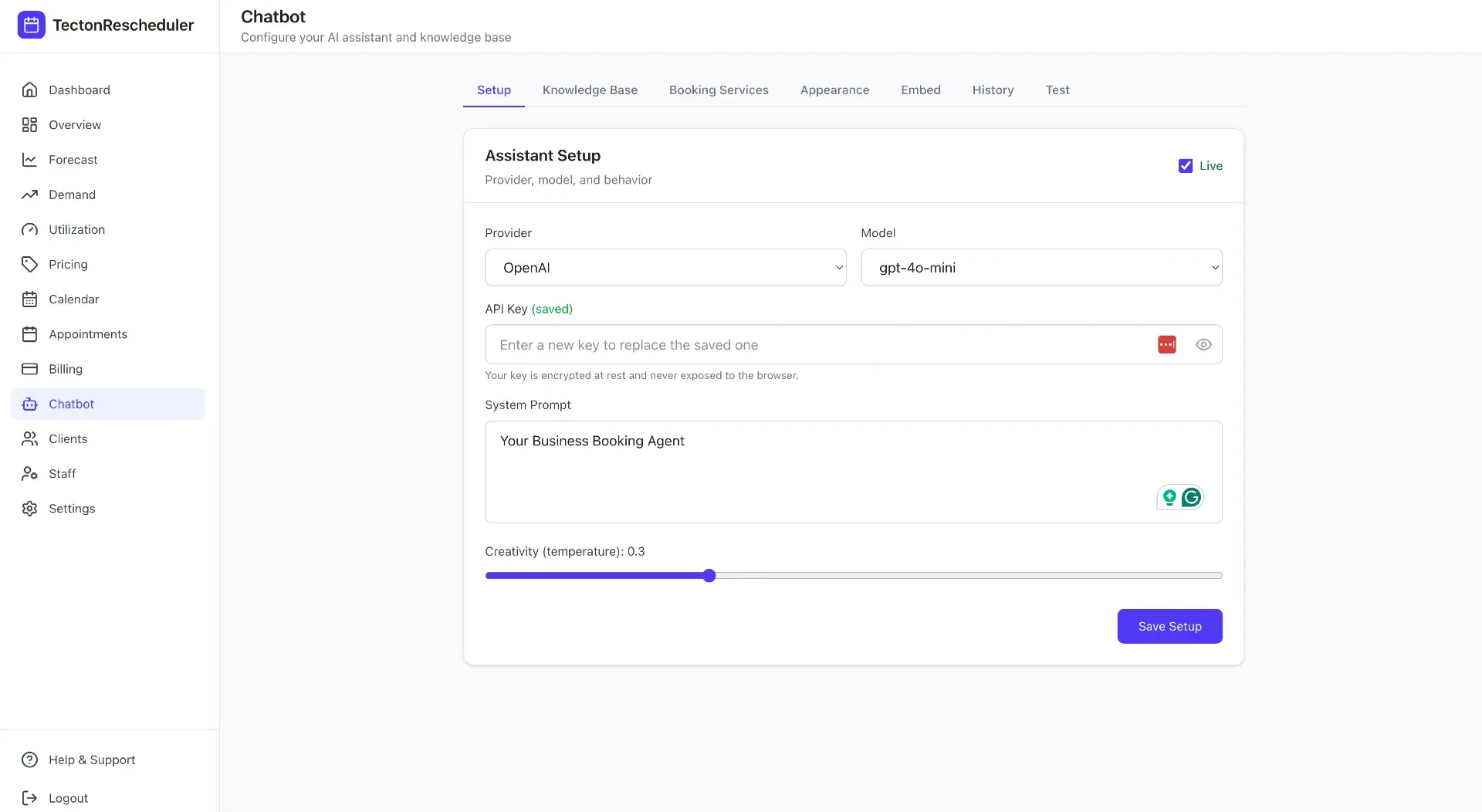
- Add your own OpenAI API key, and choose the model and system prompt — the assistant runs on your key, under your rules.
- Upload supporting documents: policies, FAQs, prep instructions, anything the catalog doesn't cover.
- Copy one script tag onto your website — that's the entire embed.
- Set origin restrictions so the widget only loads on the domains you allow.
Keep the AI on a leash you hold
Because the assistant runs on your own OpenAI key with your own system prompt, you control the tone, the model choice, and the spend. Origin restrictions make sure the widget answers only on the domains you've approved.
Bookings made through the assistant come from live Acuity availability, so double-booking isn't a failure mode you have to engineer around. Afterward, the activity flows into the rest of the layer: revenue and booking analytics with prior-period comparisons, and a read-tracked notifications feed covering reschedules, fees charged, and declined cards. Plans (Starter, Growth, and Scale) are priced to booking volume, month-to-month, with a free trial on every tier.
No-code vs. custom vs. native: which chatbot approach wins?
| No-code connectors | Custom build | Tecton assistant | |
|---|---|---|---|
| Setup time | Days to assemble and test the chain | Typically weeks of developer time | Minutes — built for a 15-minute setup |
| Cost model | Chatbot plan + automation plan + per-task fees | Developer time, hosting, and your OpenAI usage | Plan priced to booking volume + your own OpenAI usage |
| Books real appointments | Usually links out to the scheduling page | Yes, if you build the full flow | Yes — live Acuity availability with Square payment |
| Answer grounding | Whatever you typed in; drifts from your catalog | As good as the integration you build | Synced Acuity catalog + your uploaded docs |
| Maintenance | You re-test the chain whenever anything changes | You own APIs, models, prompts, and security | Managed — you control the key, model, and prompt |
The pattern: no-code buys speed at the price of grounding and reliability; custom buys control at the price of ownership; a native assistant buys grounding and real booking at the price of adopting a platform. If the chatbot's job is to answer accurately and put paid bookings on your Acuity calendar, the integration is the product — the chat window is the easy part.
Can a chatbot handle reschedules, analytics, and multiple locations?
A chatbot is the front door, not the whole house. The same clients who ask questions before booking will want to change appointments after — and Acuity's built-in answer (the confirmation-email link) is exactly the dead end the chatbot was supposed to remove. Tecton pairs the assistant with a self-serve reschedule page: clients verify their email and phone, pick a new slot from live Acuity availability, and pay any reschedule fee via Square or Stripe at confirmation. The full setup is covered in how to let clients reschedule in Acuity.
For agencies and multi-location operators, each business runs its own assistant grounded in its own synced catalog, managed from a super-admin console with per-tenant feature flags, usage, and billing monitoring. Since Acuity's official answer to running multiple businesses is separate accounts, that layer matters — see running Acuity across multiple locations.
Put this on autopilot
Tecton Scheduler does this for your Acuity account
Self-serve reschedule links with automatic fees via Square or Stripe, plus revenue, no-show, and demand analytics — synced straight from Acuity Scheduling. Live in about 15 minutes.
Frequently asked questions
Does Acuity Scheduling have a built-in AI chatbot?
No. Acuity Scheduling provides a scheduling page, confirmation emails, and reminders, but no conversational assistant. To add one, you can wire a third-party chatbot to Acuity with no-code automation, build a custom assistant on the OpenAI and Acuity APIs, or embed a natively integrated assistant such as Tecton Scheduler's, which answers from your synced service catalog.
Can an AI chatbot actually book appointments in Acuity?
It depends on the approach. Most no-code chains end with a link to your scheduling page rather than an in-chat booking. A custom build can create real bookings if you develop the full flow yourself. Tecton's assistant hands off to a booking flow that uses live Acuity availability and collects payment through Square.
Do I need my own OpenAI account to use Tecton's assistant?
Yes. The assistant runs on your own OpenAI API key, and you choose the model and the system prompt, so you control the AI's behavior and pay OpenAI directly for usage. Tecton supplies the grounding — your synced Acuity service catalog and uploaded documents — plus the booking flow, payment handling, and the embeddable widget.
How do I stop a chatbot from inventing services or prices?
Ground it in a live source of truth. Chatbots that rely on hand-typed knowledge bases drift the moment you change a price or add a service in Acuity. Tecton syncs your service catalog from Acuity on demand or on a schedule, so answers come from what you actually offer, and uploaded documents cover the policies the catalog does not.
How long does it take to add a chatbot to Acuity Scheduling?
No-code chains typically take days to assemble and test. A custom OpenAI-plus-Acuity build usually takes weeks of developer time before the edge cases are handled. Tecton's assistant is designed for a 15-minute setup: connect your Acuity account, add your OpenAI key, upload your documents, and paste one script tag into your website.
Can one chatbot serve multiple locations or client businesses?
Yes, with the right architecture. In Tecton, each business gets its own assistant grounded in its own synced Acuity catalog, and agencies or multi-location operators manage all of them from a super-admin console with usage, plans, per-tenant feature flags, and billing monitoring. Acuity itself generally points multi-location businesses toward separate accounts.
Keep reading
How to Let Clients Reschedule Their Own Appointments in Acuity
Acuity lets clients reschedule through the link in their confirmation email — but only date and time, only one appointment at a time, and only if they still have the email. This guide covers the settings that control it, why clients get stuck, and how to give them a standalone branded reschedule link.
Read guideHow to Run Multiple Locations or Businesses on Acuity Scheduling
Acuity's answer to multiple locations is more calendars; its answer to multiple businesses is more accounts. This guide covers where each setup breaks — logins, reporting, per-location comparison — and how to run the whole operation from one console.
Read guideAcuity Reschedule Links: How They Work and Their Limits
Acuity's reschedule link is generated per booking and delivered by email — which works until the email is gone. This guide covers what the link can and can't do, the dead ends, and what an always-available reschedule page changes.
Read guide